Guides

Your Complete Guide to Size AI

Master professional garment measurement, presentation, and listing tools. Complete guides for Capture, TrueShape™, Label Scanner, Model Shots, and all 92 supported garment types.

Capture Guide

Capture Guide - Professional Measurement in an Instant

Millimeter accuracy starts with proper setup.

To achieve professional tailor precision in 0.92 seconds, follow the essential steps below.

Three Steps to Accurate Measurements

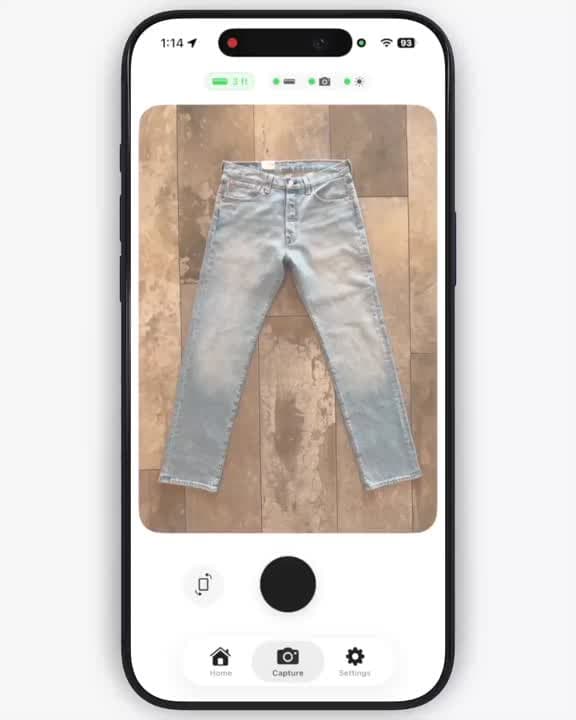
1. Place on a Flat Surface

Why it matters: Fabric drape and wrinkles can add or subtract centimeters from critical measurements like chest width, sleeve length, and inseam.

How to do it:

  • Use a floor or lay-flat board to keep the garment perfectly flat
  • Smooth the garment completely flat against the surface
  • Ensure no fabric is bunched, folded, or overlapping
  • For structured garments (blazers, jackets), button or zip them closed as they would be worn
  • For pants, ensure both legs lie flat without twisting

Pro Tip: For pants and jeans, align the inseam perfectly straight. Even small twists can affect length measurements by 1-2 centimeters.

2. Turn on Precision Guidance

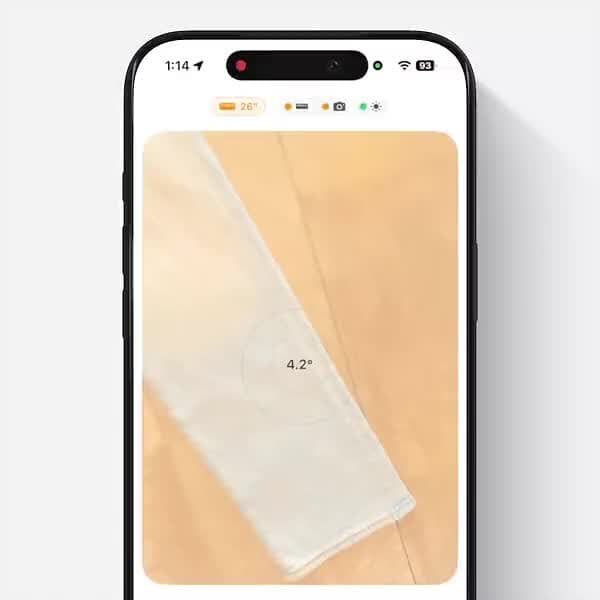
Why it matters: Size AI uses your device's LiDAR sensor to capture accurate depth information. A 90-degree camera angle ensures depth measurements are true to the garment's actual dimensions.

How to do it:

  • Enable "Precision Guidance" in the camera view
  • The app will display real-time angle indicators
  • Green indicators mean you're at the optimal 90-degree angle
  • Yellow or red indicators mean you need to adjust your camera position
  • Hold steady until all indicators are green before capturing

What you'll see:

  • Distance indicator: Keep between 0.7-1.4 meters (2.3-4.6 feet). Green = ideal distance, orange = move closer or farther
  • Camera stability: Focus and exposure stability indicator
  • Lighting assessment: Confirms adequate lighting conditions

Pro Tip: If you're photographing on the floor, stand directly above the garment rather than kneeling at an angle. This naturally positions your camera at 90 degrees.

3. Smooth Out Wrinkles

Why it matters: Major wrinkles affect dimension accuracy—flatten fabric for precise measurements. A wrinkle can make a chest measurement appear 2-3 cm smaller or larger than actual.

How to do it:

  • Use your hands to smooth fabric from center outward
  • For persistent wrinkles, lightly steam or iron the garment first
  • Pay special attention to areas that will be measured: chest, shoulders, waist, hips
  • Don't worry about minor fabric texture—just eliminate major creases and folds

When to iron: Heavy denim, canvas, or structured fabrics benefit most from pre-ironing. Lightweight knits and jersey fabrics can usually be hand-smoothed.

Keep It In Frame

Always keep the entire garment visible. The camera needs to see all edges for accurate measurements.

Guidelines:

  • Full garment visibility: Ensure no part of the garment extends beyond frame edges (sleeves, hem, collar)
  • For larger garments: Step back to keep edges clear of frame boundaries. Use editing tools to refine measurements after
  • Center positioning: Keep the garment centered in the viewfinder for balanced measurements
  • Avoid blocking garment with hands or objects

Pro Tip: If a garment is too large to fit in frame at optimal distance (0.7-1.4m), step back until the full garment is visible. The app will adjust measurements based on distance automatically.

Optimize Visibility

Lighting and contrast help our AI identify garment edges and fabric details with precision.

Lighting Best Practices

  • Natural lighting: Use daylight for even, consistent lighting across the garment
  • Avoid harsh shadows: Don't use direct sunlight that creates overexposure
  • Consistent lighting: Ensure the entire garment is evenly lit
  • Indoor lighting: Use overhead lights or ring lights for even illumination if natural light isn't available
  • Avoid mixed lighting: Don't mix daylight and artificial light (creates color casts)

Background Contrast

The principle: High contrast between garment and background ensures clean edge detection.

  • Light garments: Use dark backgrounds
  • Dark garments: Use light backgrounds
  • Clean backgrounds: Avoid busy patterns or cluttered surfaces behind the garment

Good Background Options

  • Clean floors (wood, tile, stone, clean carpet)
  • Solid-color surfaces (white poster board, dark fabric sheet)
  • Lay-flat boards
  • Any clean, solid-colored surface with good contrast to garment

What to avoid: Busy patterns, cluttered surfaces, mixed textures behind the garment

Pro Tip: Keep a white poster board and a black poster board on hand. These two backgrounds will handle most garments perfectly.

🎯 Verify Measurements After Capture

IMPORTANT: After taking a photo, always check if the measurement arrows have been placed correctly.

How to verify:

  • Review the measurement overlay immediately after capture
  • Check that arrows point to correct garment edges (shoulders, chest, waist, hem, etc.)
  • Ensure no arrows are misplaced or pointing to wrinkles/shadows

If arrows are incorrect:

  • Option 1: Retake the photo (faster and recommended)
    • Adjust garment positioning or lighting
    • Ensure better garment visibility
    • Takes only a few seconds
  • Option 2: Use the precision editor (for minor adjustments)
    • Manually adjust arrow positions
    • Fine-tune any measurement points
    • Takes more time than retaking

Best practice: If multiple arrows are wrong or garment is poorly positioned, retake the photo. If only one or two arrows need small adjustments, use the editor.

Best Practices Summary

Follow these guidelines for optimal measurement accuracy:

  • ✅ Keep the full garment visible in frame
  • ✅ Lay garment flat against surface
  • ✅ Center the garment in the viewfinder
  • ✅ Maintain optimal distance (2.3-4.6 feet / 0.7-1.4 meters)
  • ✅ Use consistent, even lighting
  • ✅ Hold device steady during capture
  • ✅ Avoid blocking garment with hands or objects
  • ✅ Verify measurement arrows after capture
  • ✅ Retake if arrows are misplaced (faster than editing)

Result: Sub-centimeter accuracy measurements ready in under 1 second.

TrueShape

TrueShape - Distraction-Free Presentation

Clear shapes. True measurements.

Professional garment visualizations with true-to-life proportions. Clean backgrounds. Buyers see exactly what they're getting.

What is TrueShape™?

TrueShape™ is Size AI's advanced background removal and garment presentation technology. It combines:

  • Professional background removal: AI-powered background extraction removes 100% of distractions
  • True-to-life proportions: Preserves actual garment shape and dimensions
  • Clean presentation: Studio-quality appearance without expensive photography setup
  • Accurate representation: Unlike model shots, TrueShape shows the exact garment you're selling

Why Use TrueShape?

Clean, Distraction-Free Display

  • Removes cluttered backgrounds and shadows
  • Lets the garment be the star of your listing
  • Professional marketplace appearance without professional photography costs

Highlights True Garment Shape

  • Shows actual silhouette and cut
  • Reveals fit characteristics (slim, relaxed, oversized)
  • Demonstrates fabric drape and structure
  • No model body shape influencing perception

Professional Marketplace Appearance

  • Consistent presentation across your entire inventory
  • Matches high-end retailer listing quality
  • Elevates your brand perception
  • Stands out in search results and feeds

Builds Buyer Confidence

  • "What you see is what you get" clarity
  • Reduces size and fit uncertainty
  • Paired with measurements, gives complete information
  • Fewer returns due to mismatched expectations

Perfect For

  • Online listings: Poshmark, eBay, Mercari, Depop, Grailed
  • Professional catalogs: Boutique inventory, wholesale lookbooks, consignment shops
  • Brand presentations: Product launches, social media, email campaigns, website pages

How to Use TrueShape™

  1. Capture your garment following the Capture Guide best practices above
  2. Wait for processing (automatic background removal takes 1-2 seconds)
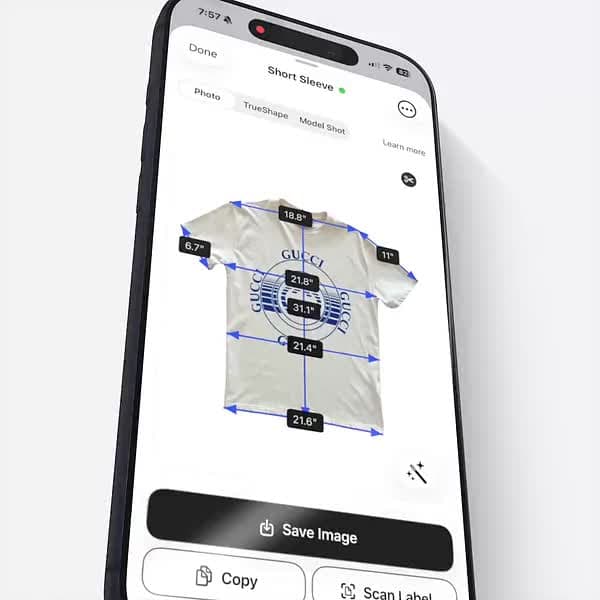
  3. View TrueShape result in the results screen
  4. Export or share your professional image

No additional steps required—TrueShape™ is automatically generated with every measurement.

Technical Details

Background Removal Quality:

  • AI-powered edge detection captures fine details (lace, fringe, distressing)
  • Preserves fabric texture and color accuracy
  • Handles complex garments (see-through fabrics, cutouts, hardware)
  • No manual editing required

Processing Time:

  • Average: 1-2 seconds per garment
  • Happens automatically during measurement processing
  • No additional uploads or waiting

Output Quality:

  • Full resolution preservation
  • No quality loss from background removal
  • Export-ready for any marketplace or use case

Label Scanner

Label Scanner - Instant Information Extraction

Scan any label. Skip the typing.

Point at any label. Brand, size, fabric, care info captured instantly. Complete information means fewer questions and faster sales.

Complete List of Captured Attributes

Size AI's Label Scanner extracts 15+ data points from garment labels using advanced OCR and AI analysis:

1. Brand Information

  • Complete brand & model information: Full brand name, model number, and model name (e.g., "Levi's 501")
  • Sub-brands & Collections: Special product lines (e.g., "Levi's Premium")

2. Size Information (Multi-Format Recognition)

  • Multi-format sizing: W30L32, Size L, EU 42, UK 10
  • Primary Size: Main size marker (e.g., "L", "30", "XL")
  • Secondary Size: Additional size info (e.g., "L32" for pants length)
  • Formatted Display: User-friendly format (e.g., "W30 L32", "Size L")
  • Size System: Regional sizing (US, EU, UK, JP)
  • International Equivalents: Multiple size formats on one label

3. Fabric Composition (Complete Breakdown)

  • Detailed fabric composition: Cotton 84%, Polyester 15%, Spandex 1%
  • Fiber Names & Percentages: All fabric components with exact percentages
  • Multiple Panels: Separate composition for shell vs. lining
  • Performance Fabrics: Moisture-wicking, UV protection, water-resistant
  • Luxury Materials: Silk, cashmere, merino wool detection

4. Advanced Stretch Analysis (5-Level System)

  • Advanced stretch analysis: 5-level classification with confidence scoring
  • Stretch Category: Minimal, Light, Medium, High, or Maximum stretch
  • Bar Rating: 1-5 visual rating system
  • Percentage Range: Estimated stretch range
  • Construction Type: Woven vs. Knit fabric
  • 4-Way Stretch Detection: Bi-directional vs. 4-way stretch
  • Recovery Properties: Whether fabric bounces back
  • Confidence Score: Accuracy rating for stretch estimate

5. Fit Classification (17 Fit Types)

  • Fit classification: 17 different fit types from Skinny to Relaxed
  • Ultra Tight: Skinny, Super Skinny
  • Fitted: Slim, Slim Straight, Slim Taper
  • Standard: Regular, Straight, Classic
  • Relaxed: Relaxed, Relaxed Straight, Loose, Baggy
  • Specialized: Athletic, Bootcut, Tapered

How it works: Cross-references label text with actual garment measurements to provide accurate fit classification even when labels are vague or missing.

6. Manufacturing Information

  • Manufacturing details: Made in Vietnam, Season F/W 2024
  • Country of Origin: Made in location
  • Season/Year: Production season
  • Factory Codes: Batch numbers and identifiers
  • Quality Certifications: OEKO-TEX, Fair Trade, organic certifications

7. Product Identification Codes

  • Product codes: Style numbers for inventory tracking
  • UPC/EAN Barcodes: Universal product codes
  • SKU Codes: Internal inventory codes
  • RN Numbers: Registered Identification Numbers
  • Item Numbers: Product codes

8. Care Instructions (Complete)

  • Washing Temperature: Cold, warm, hot water requirements
  • Washing Method: Machine wash, hand wash, dry clean only
  • Bleach Safety: Can/cannot use bleach
  • Drying Method: Tumble dry, line dry, lay flat
  • Ironing Temperature: Low, medium, high heat settings
  • Special Instructions: Wash inside out, do not wring, wash separately
  • Care Symbol Recognition: Interprets international care symbols

9. Analysis Metadata

  • Confidence Score: Overall detection accuracy (0-100%)
  • Analysis Date: Timestamp of label scan
  • Raw OCR Text: Complete text detected for verification
  • User Notes: Custom notes field (optional)
  • Error Reporting: Detailed error messages if analysis fails

How to Use Label Scanner

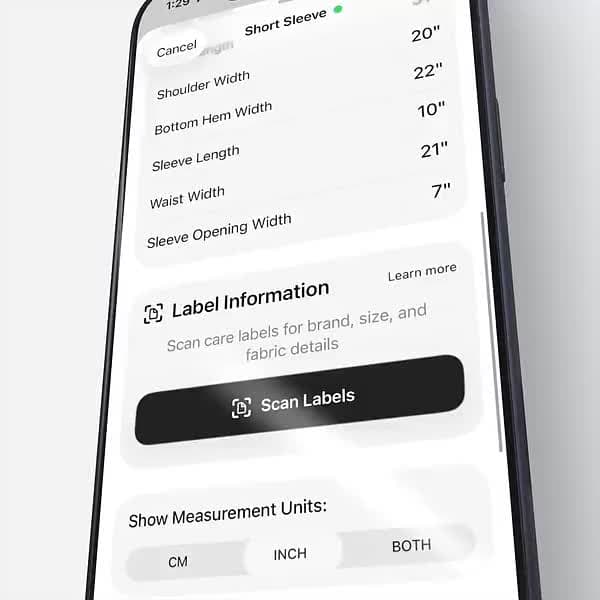
Step 1: Access Label Scanner

  • After capturing garment measurement photo
  • Tap "Scan Label" in results screen
  • Camera view opens automatically

Step 2: Position Your Label

Best practices:

  • Ensure label is fully visible and unfolded
  • Hold camera parallel to label surface (not at an angle)
  • Fill 50-75% of frame with the label
  • Ensure good lighting without glare or shadows
  • Keep camera steady for 1-2 seconds

What to scan:

  • Main brand/size label (sewn inside collar or waistband)
  • Care instruction label (often separate tag)
  • Fabric composition tag
  • Style/SKU tags attached to garments

Pro Tip: Scan multiple labels if your garment has several tags. The AI will merge information intelligently.

Step 3: Review & Edit

  • AI extracts all detected information automatically
  • Review for accuracy (AI is 95%+ accurate but can make mistakes)
  • Edit any fields if needed
  • Add notes or additional details

Step 4: Save

  • All label information saves with your garment record
  • Auto-populated in export templates
  • Available for copy-paste into listings

Benefits

  • Eliminates manual data entry errors: No typos, consistent formatting
  • Professional inventory management: Complete product data, searchable by any attribute
  • Comprehensive garment documentation: Full traceability, care instructions, fabric analysis
  • Advanced stretch and fabric analysis: 5-level stretch classification with confidence scoring
  • Time savings: 30-60 seconds eliminated per garment
  • Increased sales: Complete information builds buyer confidence

Technical Details

Recognition Accuracy:

  • Brand/Model: 98% accuracy
  • Size detection: 97% accuracy
  • Fabric composition: 95% accuracy
  • Care symbols: 94% accuracy

Supported Label Types:

  • Printed fabric labels
  • Woven labels
  • Heat transfer labels
  • Hangtag information
  • Multi-language labels (English, Spanish, French, German, Italian, Portuguese, Japanese, Chinese)

Processing Time:

  • Average: 2-3 seconds per label
  • Complex labels: 4-5 seconds
  • Instant review and editing

Model Shots

Model Shots - Studio-Quality Product Photography

Professional shots. Instant.

Transform product photos into professional model shots that sell. Pick models that match your garment. Men's jeans, women's dress, kids' tee.

🚨 IMPORTANT: Model Shot Disclaimers (BETA Feature)

AI-Generated Images - Not for Size or Fit Guidance

Model Shots are AI-generated visual enhancements designed for lifestyle presentation only. They are NOT accurate representations of how the garment will fit a real person.

Critical limitations:

  • AI-generated - not accurate for size or fit representation
  • Do not use for size guidance or fit advertising
  • Colors and details may vary from original
  • Must display with actual product photos
  • For visual enhancement only, not sizing reference

Model Selection - Age & Gender Configuration

Choose the perfect model demographic to match your garment. Size AI offers 5 age ranges and 2 gender options for precise model selection:

Age Range Options (5 Categories)

  1. Baby (0-2 years)
    • Perfect for: Infant clothing, onesies, baby dresses, rompers
    • Model presentation: Age-appropriate baby models
  2. Child (3-12 years)
    • Perfect for: Kids' clothing, school wear, children's activewear
    • Model presentation: Young children in natural poses
  3. Teen (13-17 years)
    • Perfect for: Junior sizing, teen fashion, youth athleisure
    • Model presentation: Teenage models with age-appropriate styling
  4. Adult (18-59 years)
    • Perfect for: Standard adult clothing, professional wear, casual fashion
    • Model presentation: Adult models in classic poses
    • Most common selection - default for most garments
  5. Senior (60+ years)
    • Perfect for: Senior clothing lines, mature fashion, comfort wear
    • Model presentation: Mature models

Gender Options (2 Categories)

  1. Male: For men's and boys' clothing
  2. Female: For women's and girls' clothing

Selection Examples

  • Men's Jeans → Adult Male
  • Women's Dress → Adult Female
  • Kids' T-Shirt → Child Male or Child Female
  • Baby Onesie → Baby Male or Baby Female
  • Teen Hoodie → Teen Male or Teen Female
  • Senior Cardigan → Senior Female or Senior Male

Smart Selection: Choose the age and gender that best matches your target customer. For unisex items, select based on who you're marketing to.

How It Works

  • Uses your existing measurement photo
  • Creates professional studio-quality images
  • Shows garments on models with styled presentation

Step-by-Step Process

  1. Capture your garment following Capture Guide best practices
  2. Select model demographics: Choose age and gender
  3. Generate: AI processes for 15-30 seconds
  4. Review & regenerate (optional): Adjust demographics if needed
  5. Download or share: Export high-resolution images

Best Results

For optimal Model Shot generation:

  • Natural lighting for accurate colors
  • Clean background for better detection
  • Full garment visible in frame

Pro Tip: The better your input photo quality, the better your Model Shot output. Follow Capture Guide best practices.

When to Use Model Shots

✅ Great for:

  • Social media marketing and inspiration posts
  • Lifestyle context in multi-photo listings
  • Visual variety in your product showcase
  • Email marketing and promotional materials

❌ Not appropriate for:

  • Size or fit claims
  • Advertising as actual model photography
  • Replacement for all product photos
  • Primary listing photo (use as supplementary only)

Best Practices

1. Always Pair with Actual Product Photos

Required setup:

  • Photo 1: TrueShape™ or flat-lay measurement photo
  • Photo 2-3: Detail shots (label, fabric texture, hardware)
  • Photo 4-5: Model Shots for lifestyle context

2. Disclose AI-Generated Content

Recommended disclosure: "AI-generated lifestyle photos for styling inspiration only. See product photos for actual garment."

3. Match Model to Target Customer

  • Men's products → Adult Male or Teen Male
  • Women's products → Adult Female or Teen Female
  • Kids' products → Child Male/Female
  • Baby products → Baby Male/Female

Technical Details

Generation Time:

  • Average: 15-30 seconds per garment
  • 3-5 variations generated automatically
  • Requires internet connection

Output Quality:

  • High-resolution export (web and print ready)
  • Professional studio lighting applied
  • Clean white background

Model Diversity:

  • 10 total combinations: 5 age ranges × 2 genders
  • Variety of poses per category
  • Age-appropriate presentation

Beta Status

Model Shots is currently in BETA. Quality may vary across garment types. We're actively improving the feature based on user feedback.

Please report issues if:

  • Colors are significantly inaccurate
  • Garment details are distorted
  • Model age/gender doesn't match selection
  • Results don't match garment category

Supported Garments
Size AI supports 50 plus garment types including shirts, pants, dresses, and jackets

Supported Garments - 92 Garment Types

Measure Your Full Inventory.

From everyday jeans and hoodies to blazers and dresses. 92 garment types.

9 Categories, 92 Garment Types

1. Shirts & Tops (13 types)

  • T-Shirts
  • Polo Shirts
  • Performance Shirts
  • V-Neck T-Shirts
  • Henley Shirts
  • Graphic Tees
  • Pocket T-Shirts
  • Baseball Tees
  • Long Sleeve T-Shirts
  • Dress Shirts
  • Flannel Shirts
  • Button-Down Shirts
  • Thermal Shirts

2. Sweaters & Hoodies (6 types)

  • Hoodies
  • Crew Neck Sweaters
  • Cardigans
  • Turtlenecks
  • Quarter-Zip Pullovers
  • Sweater Vests

3. Jackets & Outerwear (16 types)

  • Denim Jackets
  • Bomber Jackets
  • Blazers
  • Hooded Jackets
  • Leather Jackets
  • Windbreakers
  • Rain Jackets
  • Trucker Jackets
  • Coaches Jackets
  • Field Jackets
  • Track Jackets
  • Sport Coats
  • Shackets (Shirt Jackets)
  • Short Sleeve Button-Ups
  • Bowling Shirts
  • Camp Shirts

4. Vests & Tank Tops (8 types)

  • Puffer Vests
  • Fleece Vests
  • Suit Vests
  • Quilted Vests
  • Tank Tops
  • Athletic Tanks
  • Racerback Tanks
  • Muscle Tees

5. Pants & Jeans (14 types)

  • Jeans
  • Chinos
  • Dress Pants
  • Joggers
  • Sweatpants
  • Cargo Pants
  • Khakis
  • Skinny Jeans
  • Straight Leg Jeans
  • Wide Leg Pants
  • Bootcut Jeans
  • Track Pants
  • Corduroy Pants
  • Pleated Pants

6. Shorts (8 types)

  • Athletic Shorts
  • Chino Shorts
  • Denim Shorts
  • Basketball Shorts
  • Running Shorts
  • Cargo Shorts
  • Swim Trunks
  • Bermuda Shorts

7. Skirts (7 types)

  • Denim Skirts
  • Mini Skirts
  • Midi Skirts
  • A-Line Skirts
  • Pencil Skirts
  • Pleated Skirts
  • Maxi Skirts

8. Dresses (13 types)

  • T-Shirt Dresses
  • Sundresses
  • Wrap Dresses
  • Shift Dresses
  • Sweater Dresses
  • Maxi Dresses
  • Shirt Dresses
  • Hoodie Dresses
  • Tank Dresses
  • Sleeveless Sundresses
  • A-Line Dresses
  • Slip Dresses
  • Cami Dresses

9. Underwear (5 types)

  • Boxer Shorts
  • Boxer Briefs
  • Boy Shorts
  • Bike Shorts
  • Compression Shorts

Not Supported

Size AI measures garments only. We cannot measure:

  • Shoes & Footwear
  • Bags & Accessories
  • Jewelry & Watches
  • Hats & Headwear
  • Belts & Scarves
Capture Guide

Capture Guide - Professional Measurement in an Instant

Millimeter accuracy starts with proper setup.

To achieve professional tailor precision in 0.92 seconds, follow the essential steps below.

Three Steps to Accurate Measurements

1. Place on a Flat Surface

Why it matters: Fabric drape and wrinkles can add or subtract centimeters from critical measurements like chest width, sleeve length, and inseam.

How to do it:

  • Use a floor or lay-flat board to keep the garment perfectly flat
  • Smooth the garment completely flat against the surface
  • Ensure no fabric is bunched, folded, or overlapping
  • For structured garments (blazers, jackets), button or zip them closed as they would be worn
  • For pants, ensure both legs lie flat without twisting

Pro Tip: For pants and jeans, align the inseam perfectly straight. Even small twists can affect length measurements by 1-2 centimeters.

2. Turn on Precision Guidance

Why it matters: Size AI uses your device's LiDAR sensor to capture accurate depth information. A 90-degree camera angle ensures depth measurements are true to the garment's actual dimensions.

How to do it:

  • Enable "Precision Guidance" in the camera view
  • The app will display real-time angle indicators
  • Green indicators mean you're at the optimal 90-degree angle
  • Yellow or red indicators mean you need to adjust your camera position
  • Hold steady until all indicators are green before capturing

What you'll see:

  • Distance indicator: Keep between 0.7-1.4 meters (2.3-4.6 feet). Green = ideal distance, orange = move closer or farther
  • Camera stability: Focus and exposure stability indicator
  • Lighting assessment: Confirms adequate lighting conditions

Pro Tip: If you're photographing on the floor, stand directly above the garment rather than kneeling at an angle. This naturally positions your camera at 90 degrees.

3. Smooth Out Wrinkles

Why it matters: Major wrinkles affect dimension accuracy—flatten fabric for precise measurements. A wrinkle can make a chest measurement appear 2-3 cm smaller or larger than actual.

How to do it:

  • Use your hands to smooth fabric from center outward
  • For persistent wrinkles, lightly steam or iron the garment first
  • Pay special attention to areas that will be measured: chest, shoulders, waist, hips
  • Don't worry about minor fabric texture—just eliminate major creases and folds

When to iron: Heavy denim, canvas, or structured fabrics benefit most from pre-ironing. Lightweight knits and jersey fabrics can usually be hand-smoothed.

Keep It In Frame

Always keep the entire garment visible. The camera needs to see all edges for accurate measurements.

Guidelines:

  • Full garment visibility: Ensure no part of the garment extends beyond frame edges (sleeves, hem, collar)
  • For larger garments: Step back to keep edges clear of frame boundaries. Use editing tools to refine measurements after
  • Center positioning: Keep the garment centered in the viewfinder for balanced measurements
  • Avoid blocking garment with hands or objects

Pro Tip: If a garment is too large to fit in frame at optimal distance (0.7-1.4m), step back until the full garment is visible. The app will adjust measurements based on distance automatically.

Optimize Visibility

Lighting and contrast help our AI identify garment edges and fabric details with precision.

Lighting Best Practices

  • Natural lighting: Use daylight for even, consistent lighting across the garment
  • Avoid harsh shadows: Don't use direct sunlight that creates overexposure
  • Consistent lighting: Ensure the entire garment is evenly lit
  • Indoor lighting: Use overhead lights or ring lights for even illumination if natural light isn't available
  • Avoid mixed lighting: Don't mix daylight and artificial light (creates color casts)

Background Contrast

The principle: High contrast between garment and background ensures clean edge detection.

  • Light garments: Use dark backgrounds
  • Dark garments: Use light backgrounds
  • Clean backgrounds: Avoid busy patterns or cluttered surfaces behind the garment

Good Background Options

  • Clean floors (wood, tile, stone, clean carpet)
  • Solid-color surfaces (white poster board, dark fabric sheet)
  • Lay-flat boards
  • Any clean, solid-colored surface with good contrast to garment

What to avoid: Busy patterns, cluttered surfaces, mixed textures behind the garment

Pro Tip: Keep a white poster board and a black poster board on hand. These two backgrounds will handle most garments perfectly.

🎯 Verify Measurements After Capture

IMPORTANT: After taking a photo, always check if the measurement arrows have been placed correctly.

How to verify:

  • Review the measurement overlay immediately after capture
  • Check that arrows point to correct garment edges (shoulders, chest, waist, hem, etc.)
  • Ensure no arrows are misplaced or pointing to wrinkles/shadows

If arrows are incorrect:

  • Option 1: Retake the photo (faster and recommended)
    • Adjust garment positioning or lighting
    • Ensure better garment visibility
    • Takes only a few seconds
  • Option 2: Use the precision editor (for minor adjustments)
    • Manually adjust arrow positions
    • Fine-tune any measurement points
    • Takes more time than retaking

Best practice: If multiple arrows are wrong or garment is poorly positioned, retake the photo. If only one or two arrows need small adjustments, use the editor.

Best Practices Summary

Follow these guidelines for optimal measurement accuracy:

  • ✅ Keep the full garment visible in frame
  • ✅ Lay garment flat against surface
  • ✅ Center the garment in the viewfinder
  • ✅ Maintain optimal distance (2.3-4.6 feet / 0.7-1.4 meters)
  • ✅ Use consistent, even lighting
  • ✅ Hold device steady during capture
  • ✅ Avoid blocking garment with hands or objects
  • ✅ Verify measurement arrows after capture
  • ✅ Retake if arrows are misplaced (faster than editing)

Result: Sub-centimeter accuracy measurements ready in under 1 second.

Model Shots

Model Shots - Studio-Quality Product Photography

Professional shots. Instant.

Transform product photos into professional model shots that sell. Pick models that match your garment. Men's jeans, women's dress, kids' tee.

🚨 IMPORTANT: Model Shot Disclaimers (BETA Feature)

AI-Generated Images - Not for Size or Fit Guidance

Model Shots are AI-generated visual enhancements designed for lifestyle presentation only. They are NOT accurate representations of how the garment will fit a real person.

Critical limitations:

  • AI-generated - not accurate for size or fit representation
  • Do not use for size guidance or fit advertising
  • Colors and details may vary from original
  • Must display with actual product photos
  • For visual enhancement only, not sizing reference

Model Selection - Age & Gender Configuration

Choose the perfect model demographic to match your garment. Size AI offers 5 age ranges and 2 gender options for precise model selection:

Age Range Options (5 Categories)

  1. Baby (0-2 years)
    • Perfect for: Infant clothing, onesies, baby dresses, rompers
    • Model presentation: Age-appropriate baby models
  2. Child (3-12 years)
    • Perfect for: Kids' clothing, school wear, children's activewear
    • Model presentation: Young children in natural poses
  3. Teen (13-17 years)
    • Perfect for: Junior sizing, teen fashion, youth athleisure
    • Model presentation: Teenage models with age-appropriate styling
  4. Adult (18-59 years)
    • Perfect for: Standard adult clothing, professional wear, casual fashion
    • Model presentation: Adult models in classic poses
    • Most common selection - default for most garments
  5. Senior (60+ years)
    • Perfect for: Senior clothing lines, mature fashion, comfort wear
    • Model presentation: Mature models

Gender Options (2 Categories)

  1. Male: For men's and boys' clothing
  2. Female: For women's and girls' clothing

Selection Examples

  • Men's Jeans → Adult Male
  • Women's Dress → Adult Female
  • Kids' T-Shirt → Child Male or Child Female
  • Baby Onesie → Baby Male or Baby Female
  • Teen Hoodie → Teen Male or Teen Female
  • Senior Cardigan → Senior Female or Senior Male

Smart Selection: Choose the age and gender that best matches your target customer. For unisex items, select based on who you're marketing to.

How It Works

  • Uses your existing measurement photo
  • Creates professional studio-quality images
  • Shows garments on models with styled presentation

Step-by-Step Process

  1. Capture your garment following Capture Guide best practices
  2. Select model demographics: Choose age and gender
  3. Generate: AI processes for 15-30 seconds
  4. Review & regenerate (optional): Adjust demographics if needed
  5. Download or share: Export high-resolution images

Best Results

For optimal Model Shot generation:

  • Natural lighting for accurate colors
  • Clean background for better detection
  • Full garment visible in frame

Pro Tip: The better your input photo quality, the better your Model Shot output. Follow Capture Guide best practices.

When to Use Model Shots

✅ Great for:

  • Social media marketing and inspiration posts
  • Lifestyle context in multi-photo listings
  • Visual variety in your product showcase
  • Email marketing and promotional materials

❌ Not appropriate for:

  • Size or fit claims
  • Advertising as actual model photography
  • Replacement for all product photos
  • Primary listing photo (use as supplementary only)

Best Practices

1. Always Pair with Actual Product Photos

Required setup:

  • Photo 1: TrueShape™ or flat-lay measurement photo
  • Photo 2-3: Detail shots (label, fabric texture, hardware)
  • Photo 4-5: Model Shots for lifestyle context

2. Disclose AI-Generated Content

Recommended disclosure: "AI-generated lifestyle photos for styling inspiration only. See product photos for actual garment."

3. Match Model to Target Customer

  • Men's products → Adult Male or Teen Male
  • Women's products → Adult Female or Teen Female
  • Kids' products → Child Male/Female
  • Baby products → Baby Male/Female

Technical Details

Generation Time:

  • Average: 15-30 seconds per garment
  • 3-5 variations generated automatically
  • Requires internet connection

Output Quality:

  • High-resolution export (web and print ready)
  • Professional studio lighting applied
  • Clean white background

Model Diversity:

  • 10 total combinations: 5 age ranges × 2 genders
  • Variety of poses per category
  • Age-appropriate presentation

Beta Status

Model Shots is currently in BETA. Quality may vary across garment types. We're actively improving the feature based on user feedback.

Please report issues if:

  • Colors are significantly inaccurate
  • Garment details are distorted
  • Model age/gender doesn't match selection
  • Results don't match garment category

Label Scanner

Label Scanner - Instant Information Extraction

Scan any label. Skip the typing.

Point at any label. Brand, size, fabric, care info captured instantly. Complete information means fewer questions and faster sales.

Complete List of Captured Attributes

Size AI's Label Scanner extracts 15+ data points from garment labels using advanced OCR and AI analysis:

1. Brand Information

  • Complete brand & model information: Full brand name, model number, and model name (e.g., "Levi's 501")
  • Sub-brands & Collections: Special product lines (e.g., "Levi's Premium")

2. Size Information (Multi-Format Recognition)

  • Multi-format sizing: W30L32, Size L, EU 42, UK 10
  • Primary Size: Main size marker (e.g., "L", "30", "XL")
  • Secondary Size: Additional size info (e.g., "L32" for pants length)
  • Formatted Display: User-friendly format (e.g., "W30 L32", "Size L")
  • Size System: Regional sizing (US, EU, UK, JP)
  • International Equivalents: Multiple size formats on one label

3. Fabric Composition (Complete Breakdown)

  • Detailed fabric composition: Cotton 84%, Polyester 15%, Spandex 1%
  • Fiber Names & Percentages: All fabric components with exact percentages
  • Multiple Panels: Separate composition for shell vs. lining
  • Performance Fabrics: Moisture-wicking, UV protection, water-resistant
  • Luxury Materials: Silk, cashmere, merino wool detection

4. Advanced Stretch Analysis (5-Level System)

  • Advanced stretch analysis: 5-level classification with confidence scoring
  • Stretch Category: Minimal, Light, Medium, High, or Maximum stretch
  • Bar Rating: 1-5 visual rating system
  • Percentage Range: Estimated stretch range
  • Construction Type: Woven vs. Knit fabric
  • 4-Way Stretch Detection: Bi-directional vs. 4-way stretch
  • Recovery Properties: Whether fabric bounces back
  • Confidence Score: Accuracy rating for stretch estimate

5. Fit Classification (17 Fit Types)

  • Fit classification: 17 different fit types from Skinny to Relaxed
  • Ultra Tight: Skinny, Super Skinny
  • Fitted: Slim, Slim Straight, Slim Taper
  • Standard: Regular, Straight, Classic
  • Relaxed: Relaxed, Relaxed Straight, Loose, Baggy
  • Specialized: Athletic, Bootcut, Tapered

How it works: Cross-references label text with actual garment measurements to provide accurate fit classification even when labels are vague or missing.

6. Manufacturing Information

  • Manufacturing details: Made in Vietnam, Season F/W 2024
  • Country of Origin: Made in location
  • Season/Year: Production season
  • Factory Codes: Batch numbers and identifiers
  • Quality Certifications: OEKO-TEX, Fair Trade, organic certifications

7. Product Identification Codes

  • Product codes: Style numbers for inventory tracking
  • UPC/EAN Barcodes: Universal product codes
  • SKU Codes: Internal inventory codes
  • RN Numbers: Registered Identification Numbers
  • Item Numbers: Product codes

8. Care Instructions (Complete)

  • Washing Temperature: Cold, warm, hot water requirements
  • Washing Method: Machine wash, hand wash, dry clean only
  • Bleach Safety: Can/cannot use bleach
  • Drying Method: Tumble dry, line dry, lay flat
  • Ironing Temperature: Low, medium, high heat settings
  • Special Instructions: Wash inside out, do not wring, wash separately
  • Care Symbol Recognition: Interprets international care symbols

9. Analysis Metadata

  • Confidence Score: Overall detection accuracy (0-100%)
  • Analysis Date: Timestamp of label scan
  • Raw OCR Text: Complete text detected for verification
  • User Notes: Custom notes field (optional)
  • Error Reporting: Detailed error messages if analysis fails

How to Use Label Scanner

Step 1: Access Label Scanner

  • After capturing garment measurement photo
  • Tap "Scan Label" in results screen
  • Camera view opens automatically

Step 2: Position Your Label

Best practices:

  • Ensure label is fully visible and unfolded
  • Hold camera parallel to label surface (not at an angle)
  • Fill 50-75% of frame with the label
  • Ensure good lighting without glare or shadows
  • Keep camera steady for 1-2 seconds

What to scan:

  • Main brand/size label (sewn inside collar or waistband)
  • Care instruction label (often separate tag)
  • Fabric composition tag
  • Style/SKU tags attached to garments

Pro Tip: Scan multiple labels if your garment has several tags. The AI will merge information intelligently.

Step 3: Review & Edit

  • AI extracts all detected information automatically
  • Review for accuracy (AI is 95%+ accurate but can make mistakes)
  • Edit any fields if needed
  • Add notes or additional details

Step 4: Save

  • All label information saves with your garment record
  • Auto-populated in export templates
  • Available for copy-paste into listings

Benefits

  • Eliminates manual data entry errors: No typos, consistent formatting
  • Professional inventory management: Complete product data, searchable by any attribute
  • Comprehensive garment documentation: Full traceability, care instructions, fabric analysis
  • Advanced stretch and fabric analysis: 5-level stretch classification with confidence scoring
  • Time savings: 30-60 seconds eliminated per garment
  • Increased sales: Complete information builds buyer confidence

Technical Details

Recognition Accuracy:

  • Brand/Model: 98% accuracy
  • Size detection: 97% accuracy
  • Fabric composition: 95% accuracy
  • Care symbols: 94% accuracy

Supported Label Types:

  • Printed fabric labels
  • Woven labels
  • Heat transfer labels
  • Hangtag information
  • Multi-language labels (English, Spanish, French, German, Italian, Portuguese, Japanese, Chinese)

Processing Time:

  • Average: 2-3 seconds per label
  • Complex labels: 4-5 seconds
  • Instant review and editing

TrueShape

TrueShape - Distraction-Free Presentation

Clear shapes. True measurements.

Professional garment visualizations with true-to-life proportions. Clean backgrounds. Buyers see exactly what they're getting.

What is TrueShape™?

TrueShape™ is Size AI's advanced background removal and garment presentation technology. It combines:

  • Professional background removal: AI-powered background extraction removes 100% of distractions
  • True-to-life proportions: Preserves actual garment shape and dimensions
  • Clean presentation: Studio-quality appearance without expensive photography setup
  • Accurate representation: Unlike model shots, TrueShape shows the exact garment you're selling

Why Use TrueShape?

Clean, Distraction-Free Display

  • Removes cluttered backgrounds and shadows
  • Lets the garment be the star of your listing
  • Professional marketplace appearance without professional photography costs

Highlights True Garment Shape

  • Shows actual silhouette and cut
  • Reveals fit characteristics (slim, relaxed, oversized)
  • Demonstrates fabric drape and structure
  • No model body shape influencing perception

Professional Marketplace Appearance

  • Consistent presentation across your entire inventory
  • Matches high-end retailer listing quality
  • Elevates your brand perception
  • Stands out in search results and feeds

Builds Buyer Confidence

  • "What you see is what you get" clarity
  • Reduces size and fit uncertainty
  • Paired with measurements, gives complete information
  • Fewer returns due to mismatched expectations

Perfect For

  • Online listings: Poshmark, eBay, Mercari, Depop, Grailed
  • Professional catalogs: Boutique inventory, wholesale lookbooks, consignment shops
  • Brand presentations: Product launches, social media, email campaigns, website pages

How to Use TrueShape™

  1. Capture your garment following the Capture Guide best practices above
  2. Wait for processing (automatic background removal takes 1-2 seconds)
  3. View TrueShape result in the results screen
  4. Export or share your professional image

No additional steps required—TrueShape™ is automatically generated with every measurement.

Technical Details

Background Removal Quality:

  • AI-powered edge detection captures fine details (lace, fringe, distressing)
  • Preserves fabric texture and color accuracy
  • Handles complex garments (see-through fabrics, cutouts, hardware)
  • No manual editing required

Processing Time:

  • Average: 1-2 seconds per garment
  • Happens automatically during measurement processing
  • No additional uploads or waiting

Output Quality:

  • Full resolution preservation
  • No quality loss from background removal
  • Export-ready for any marketplace or use case

Supported Garments
Size AI supports 50 plus garment types including shirts, pants, dresses, and jackets

Supported Garments - 92 Garment Types

Measure Your Full Inventory.

From everyday jeans and hoodies to blazers and dresses. 92 garment types.

9 Categories, 92 Garment Types

1. Shirts & Tops (13 types)

  • T-Shirts
  • Polo Shirts
  • Performance Shirts
  • V-Neck T-Shirts
  • Henley Shirts
  • Graphic Tees
  • Pocket T-Shirts
  • Baseball Tees
  • Long Sleeve T-Shirts
  • Dress Shirts
  • Flannel Shirts
  • Button-Down Shirts
  • Thermal Shirts

2. Sweaters & Hoodies (6 types)

  • Hoodies
  • Crew Neck Sweaters
  • Cardigans
  • Turtlenecks
  • Quarter-Zip Pullovers
  • Sweater Vests

3. Jackets & Outerwear (16 types)

  • Denim Jackets
  • Bomber Jackets
  • Blazers
  • Hooded Jackets
  • Leather Jackets
  • Windbreakers
  • Rain Jackets
  • Trucker Jackets
  • Coaches Jackets
  • Field Jackets
  • Track Jackets
  • Sport Coats
  • Shackets (Shirt Jackets)
  • Short Sleeve Button-Ups
  • Bowling Shirts
  • Camp Shirts

4. Vests & Tank Tops (8 types)

  • Puffer Vests
  • Fleece Vests
  • Suit Vests
  • Quilted Vests
  • Tank Tops
  • Athletic Tanks
  • Racerback Tanks
  • Muscle Tees

5. Pants & Jeans (14 types)

  • Jeans
  • Chinos
  • Dress Pants
  • Joggers
  • Sweatpants
  • Cargo Pants
  • Khakis
  • Skinny Jeans
  • Straight Leg Jeans
  • Wide Leg Pants
  • Bootcut Jeans
  • Track Pants
  • Corduroy Pants
  • Pleated Pants

6. Shorts (8 types)

  • Athletic Shorts
  • Chino Shorts
  • Denim Shorts
  • Basketball Shorts
  • Running Shorts
  • Cargo Shorts
  • Swim Trunks
  • Bermuda Shorts

7. Skirts (7 types)

  • Denim Skirts
  • Mini Skirts
  • Midi Skirts
  • A-Line Skirts
  • Pencil Skirts
  • Pleated Skirts
  • Maxi Skirts

8. Dresses (13 types)

  • T-Shirt Dresses
  • Sundresses
  • Wrap Dresses
  • Shift Dresses
  • Sweater Dresses
  • Maxi Dresses
  • Shirt Dresses
  • Hoodie Dresses
  • Tank Dresses
  • Sleeveless Sundresses
  • A-Line Dresses
  • Slip Dresses
  • Cami Dresses

9. Underwear (5 types)

  • Boxer Shorts
  • Boxer Briefs
  • Boy Shorts
  • Bike Shorts
  • Compression Shorts

Not Supported

Size AI measures garments only. We cannot measure:

  • Shoes & Footwear
  • Bags & Accessories
  • Jewelry & Watches
  • Hats & Headwear
  • Belts & Scarves
FAQ

Questions?
We have answers.

Everything you need to know about Size AI and professional garment measurements.
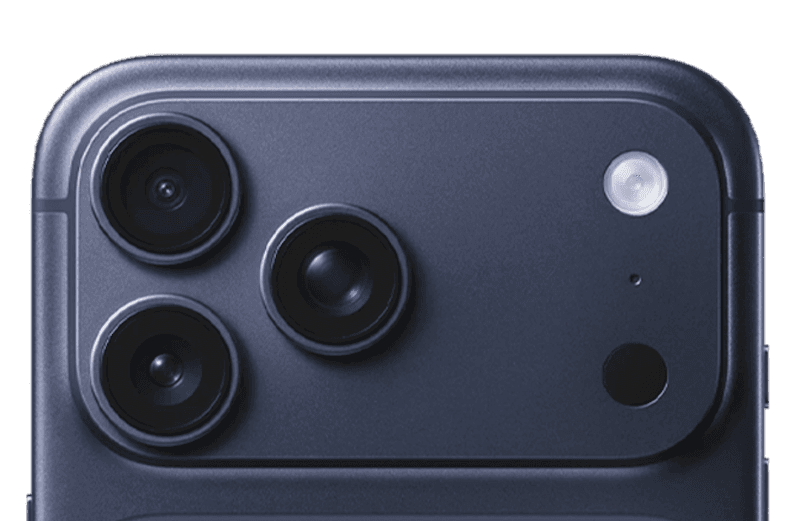
What devices does Size AI work on?

What is TrueShape™ visualization?

How do Model Shots work?

What garments are supported?

How accurate are the measurements?

How does the label scanner work?

Can I use Size AI for my business or marketplace?

Download Size AI free. Start measuring professionally in minutes.
Download Now