Skip to content

Garment measurement from your iPhone.

Updated · 5 steps · 11 min read

Size AI is a clothing measurement app for iPhone. Lay a garment flat, tap once, and it returns up to 12 measurements in 0.92 seconds at ~5 mm (1⁄5 in) typical accuracy with LiDAR, across 90+ garment types.

Capture
0.92 s
Accuracy
~5 mm (1⁄5 in) typical with LiDAR
Measurements
Up to 12 per garment
Garment types
90+

Get Size AI on the App Store · free plan, 10 scans a month, no credit card

How Size AI measures a garment

Measuring a garment takes one action: lay it flat and take one capture. Size AI handles everything after the tap on its own, in 0.92 seconds.

What you do

Lay the garment flat and take one capture

Smooth the garment out on a plain, flat surface, hold your iPhone straight above it, and tap the shutter once. As the camera takes the photo, your iPhone’s LiDAR sensor builds a depth map of the garment. That one capture is all Size AI needs.

The five setup steps below cover the surface, the light, and the framing.

In the app: a pair of jeans is captured, the arrows appear, and TrueShape removes the background.

What happens automatically

You don’t place points or type numbers. In 0.92 seconds, Size AI finds the points and draws up to 12 measurements on the garment, at ~5 mm typical with LiDAR.

Already using the app? The capture-screen guide explains the level guide, the distance and light indicators, and the Precision Editor.
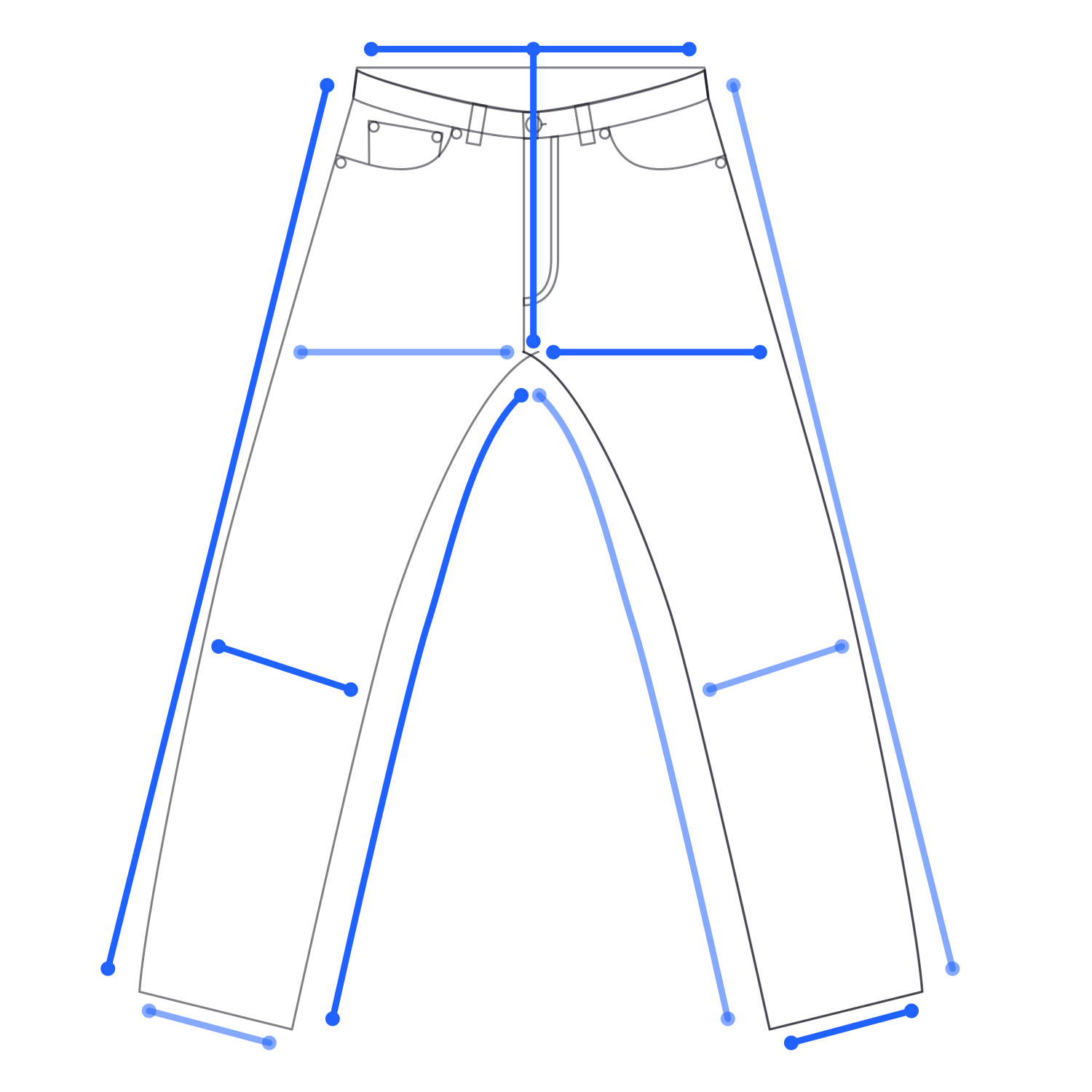
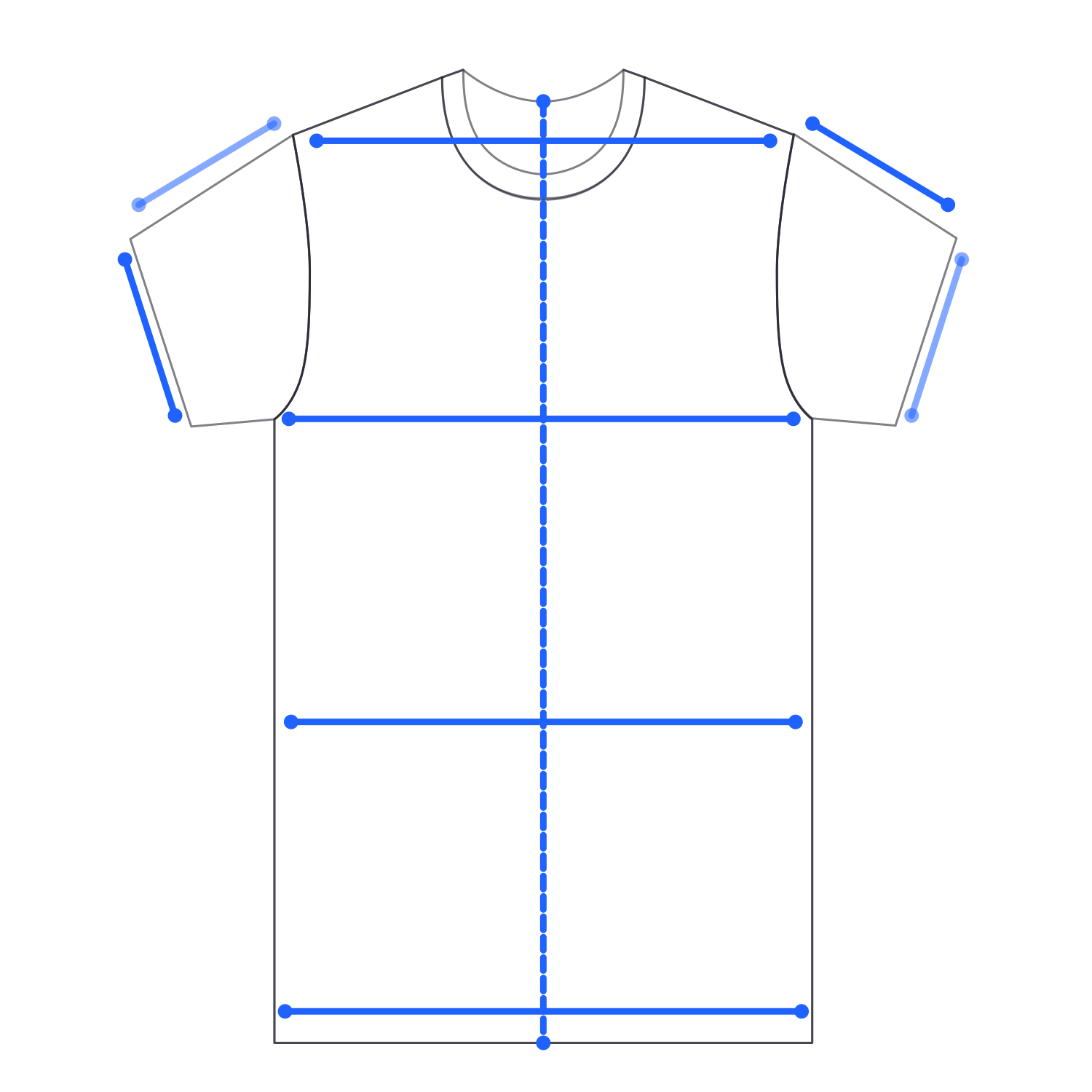
T-shirt drawing with its points of measure markedJeans drawing with its points of measure marked

It finds the measurement points

An on-device model reads more than 200 data points from the capture and picks the measurements by the garment’s shape: chest, shoulder, and sleeve on a shirt, or waist, rise, and inseam on jeans.

Check the arrows: measurement arrows across a T-shirt for chest, body length, sleeve and hem.Check the arrowsCheck the arrows

It draws the arrows

Each measurement lands on screen as an arrow across the garment. Glance at the arrows before you save. If one sits on a wrinkle, drag that point into place in the Precision Editor or retake the shot.

How to measure clothes correctly with Size AI

Five steps, taken from the app's own capture tips. Work through them in order before you tap the shutter.

  1. 1

    Lay the garment flat

    Smooth out wrinkles on a flat surface, button or zip it closed, and keep trouser inseams straight. Folds and creases can shift a measurement by 2–3 cm (0.8–1.2 in), which is enough to put a buyer in the wrong size.

    Lay it flat: a T-shirt settles flat on the surface and its wrinkles smooth out.Smooth & flatSmooth & flat
  2. 2

    Even light, plain surface

    Use a well-lit room with even lighting, and put light garments on a dark surface and dark garments on a light one, with no busy pattern behind them. Harsh shadows and low contrast hide the edges Size AI measures to.

    Even light, plain surface: a light T-shirt on a dark surface next to a dark T-shirt on a light surface.Light garmentsUse dark backgroundsDark garmentsUse light backgrounds
  3. 3

    Hold the phone flat, straight above

    Hold your iPhone directly over the garment and follow the level guide until a haptic tap confirms alignment. Size AI can only measure what it can see, and Precision Guidance shows when the camera is at 90 degrees, the angle LiDAR needs for an accurate depth read.

    Hold straight above: seen from the side, the phone levels out directly over the garment instead of at an angle.Move aboveMove above
  4. 4

    Fill the frame at about 0.9–1.4 m (3–4.5 ft)

    Keep the whole garment inside the frame with no sleeve or hem cut off, and keep hands and objects out of the shot. The distance indicator turns green at a good distance and orange when you need to move closer or further back.

    Fill the frame: the whole T-shirt fills the camera frame and the frame corners turn green.Fill the frameFill the frame
  5. 5

    Portrait for tall items, landscape for wide ones

    Shoot jeans and shirts in portrait. For larger items like jackets, coats, and dresses, tap the rotate button to switch to horizontal mode so nothing gets cropped.

    Portrait or landscape: jeans fit a portrait frame, a wide jacket fits a landscape frame.Portrait · tall itemsLandscape · wide items

Tap the shutter. 0.92 seconds later the arrows are on screen.

Common mistakes (and the fix for each)

These seven setup mistakes are the usual reasons a Size AI arrow lands in the wrong place. Each pair shows the mistake next to the fix.

Hanger vs laid flat

A T-shirt laid flat inside the camera frame.
DoLaid flat, smoothed out, shot straight down.
A wrinkled T-shirt on a hanger, tilted at an angle.
Don'tOn a hanger, at an angle, wrinkled.

Angle vs straight above

Side view: the phone held level, directly above the garment.
DoDirectly over the garment, not at an angle.
Side view: the phone tilted, shooting the garment at an angle.
Don'tTilted off 90 degrees, so the depth read distorts.

Wrinkled vs smoothed

A smooth T-shirt lying flat.
DoSmooth out wrinkles on a flat surface.
A T-shirt with folds and creases across the body.
Don'tFolds and creases shift the measurements.

Light on light vs a contrasting surface

A light T-shirt on a dark surface, edges clearly visible.
DoLight garment on a dark surface.
A light T-shirt on a light surface, edges barely visible.
Don'tLight garment on a light surface: the edges disappear.

Cropped vs whole garment

The whole T-shirt inside the camera frame.
DoWhole garment inside the frame.
A T-shirt too close to the camera, one sleeve cut off by the frame.
Don'tA sleeve cut off by the frame.

Hand in frame vs clear

A T-shirt with nothing covering it.
DoNothing covering the garment.
A hand holding down the hem of a T-shirt inside the frame.
Don'tA hand holding the hem in frame.

Jacket open vs closed

A jacket laid flat, buttoned closed.
DoButtoned or zipped closed before it goes down.
A jacket laid flat with its fronts hanging open.
Don'tLeft open: it captures wider than the jacket is.

Tip: Two or more arrows off? Retake. One arrow off? Fix it in the Precision Editor.

A fresh capture is faster than dragging several points by hand. For more setup tricks, from picking a hard surface to smoothing fabric from the center out, read the flat-lay cheat sheet.

What Size AI measures, garment by garment

Size AI reads the garment's shape, not its label, so anything shaped like trousers gets the trouser set. Its 90+ garment types in 9 categories share the measurement shapes below, with up to 12 measurements per garment.

With Size AI, jeans get 12 measurements, T-shirts and shirts get 9, jackets get 6, and skirts get 5. Every width is measured flat, and sleeves and legs are measured on both sides where the app reads both. Is my garment supported? See all 90+ garment types.

  • Short-sleeve top drawing with its points of measure marked

    T-shirts & tops

    T-shirts, polos, henleys, short-sleeve shirts

    • Chest width
    • Body length
    • Shoulder width
    • Waist width
    • Hem width
    • Sleeve length L+R
    • Sleeve opening L+R

    9 measurements

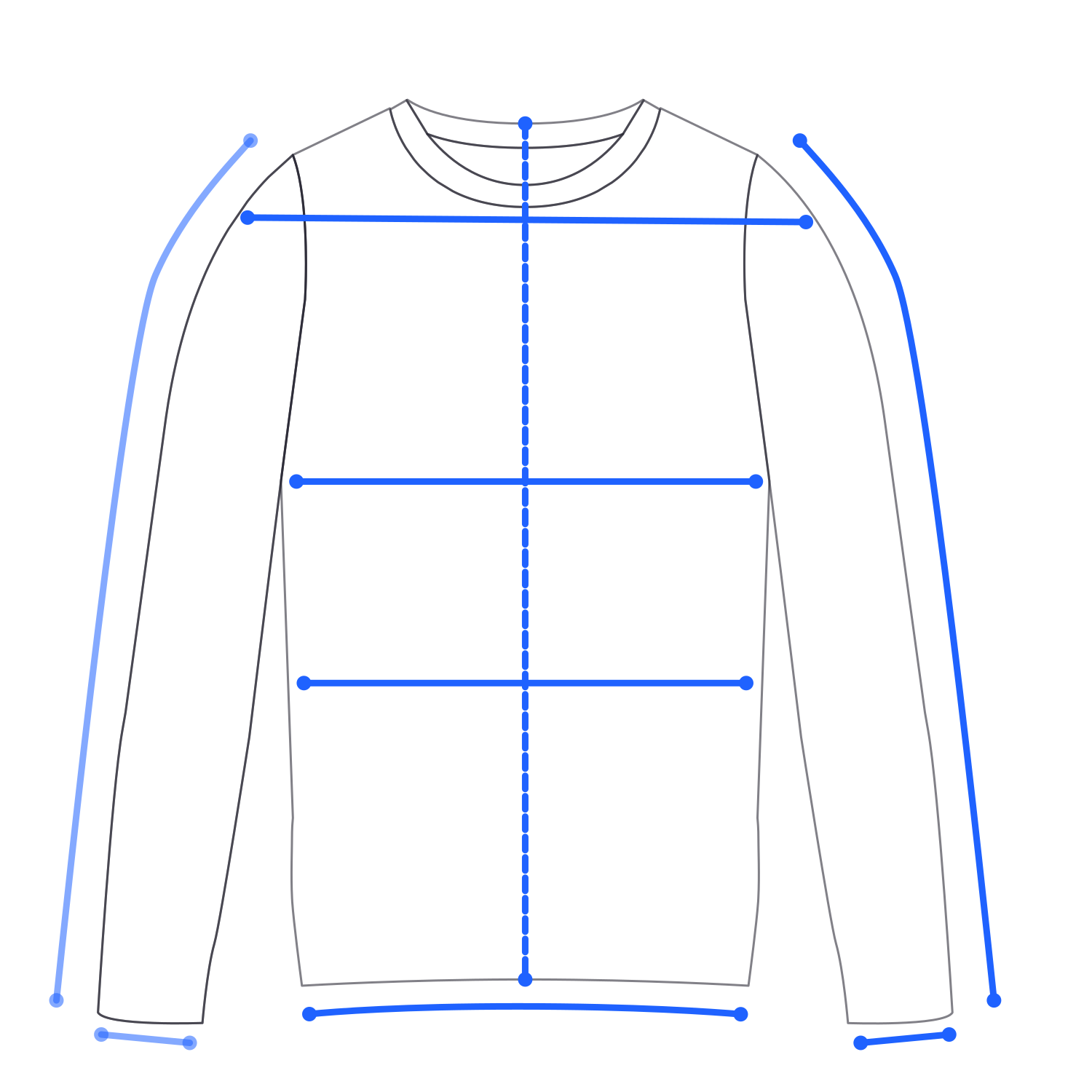
  • Long-sleeve top drawing with its points of measure marked

    Shirts, blouses & knitwear

    Long-sleeve tees, shirts, blouses, sweaters, hoodies

    • Chest width
    • Body length
    • Shoulder width
    • Waist width
    • Hem width
    • Sleeve length L+R
    • Sleeve opening L+R

    9 measurements

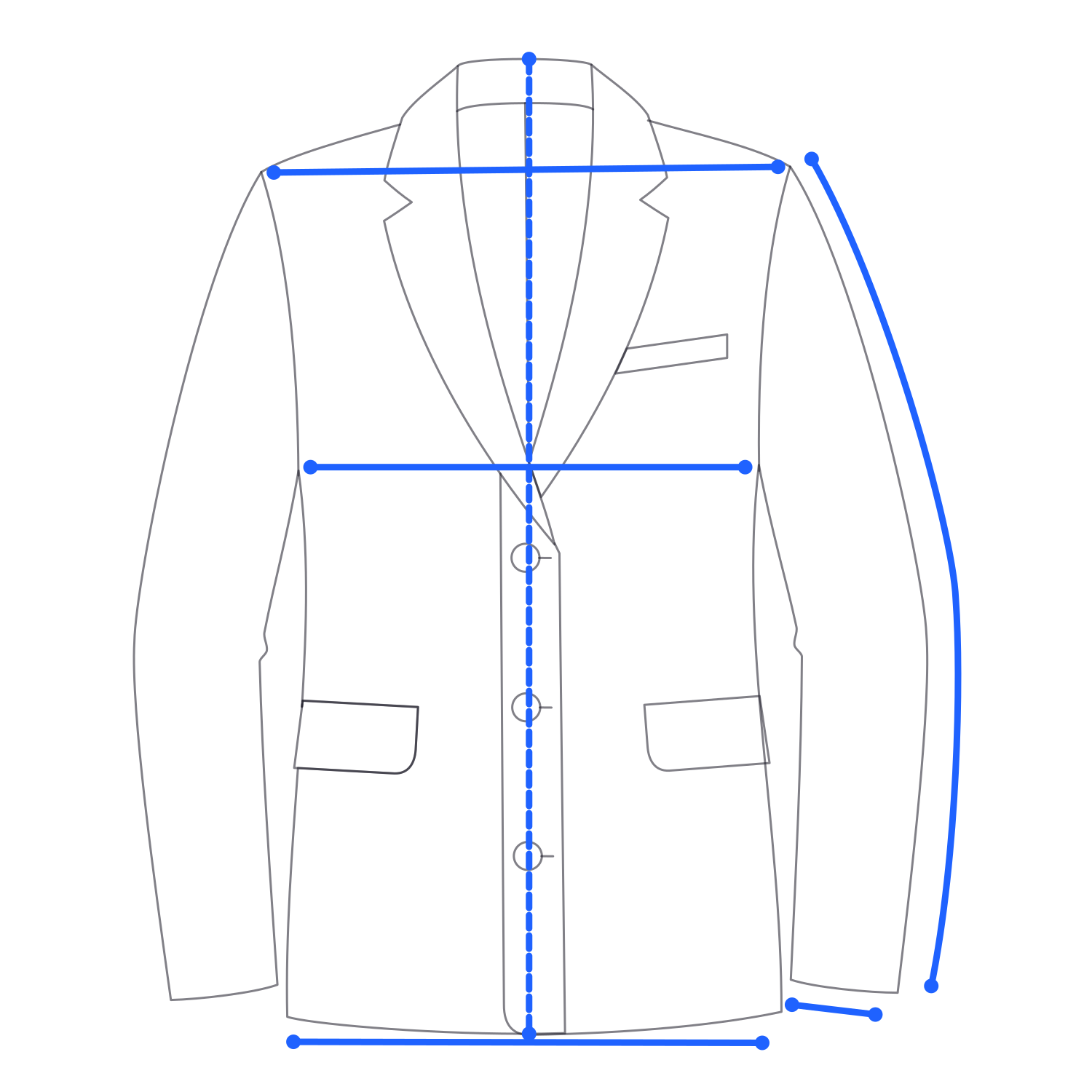
  • Jacket drawing with its points of measure marked

    Jackets & coats

    Blazers, sport coats, leather, denim and bomber jackets

    • Chest width
    • Body length
    • Shoulder width
    • Sleeve length
    • Sleeve opening
    • Hem width

    6 measurements

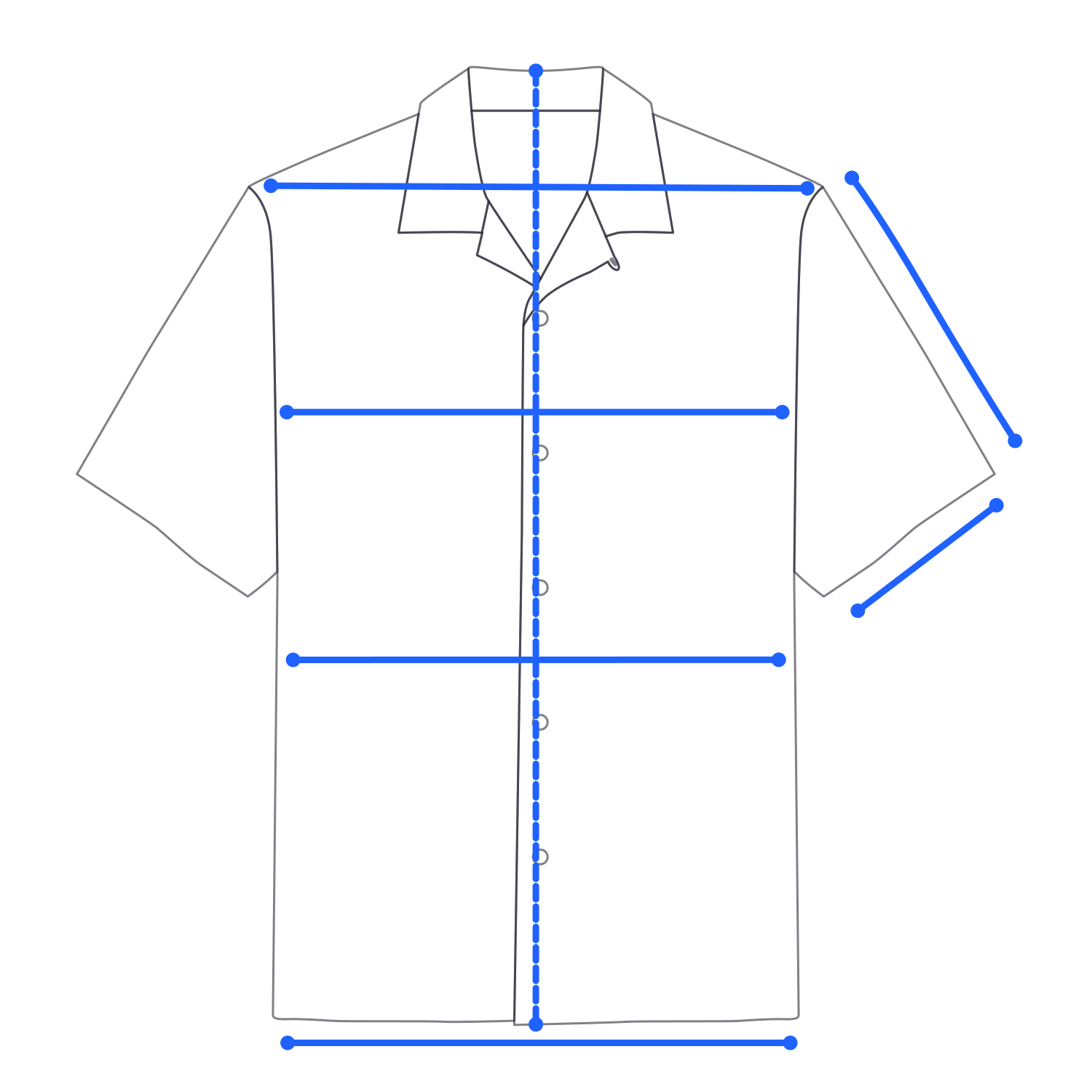
  • Short-sleeve jacket drawing with its points of measure marked

    Short-sleeve jackets & camp shirts

    Short-sleeve button-ups, bowling and camp shirts

    • Chest width
    • Body length
    • Shoulder width
    • Waist width
    • Hem width
    • Sleeve length
    • Sleeve opening

    7 measurements

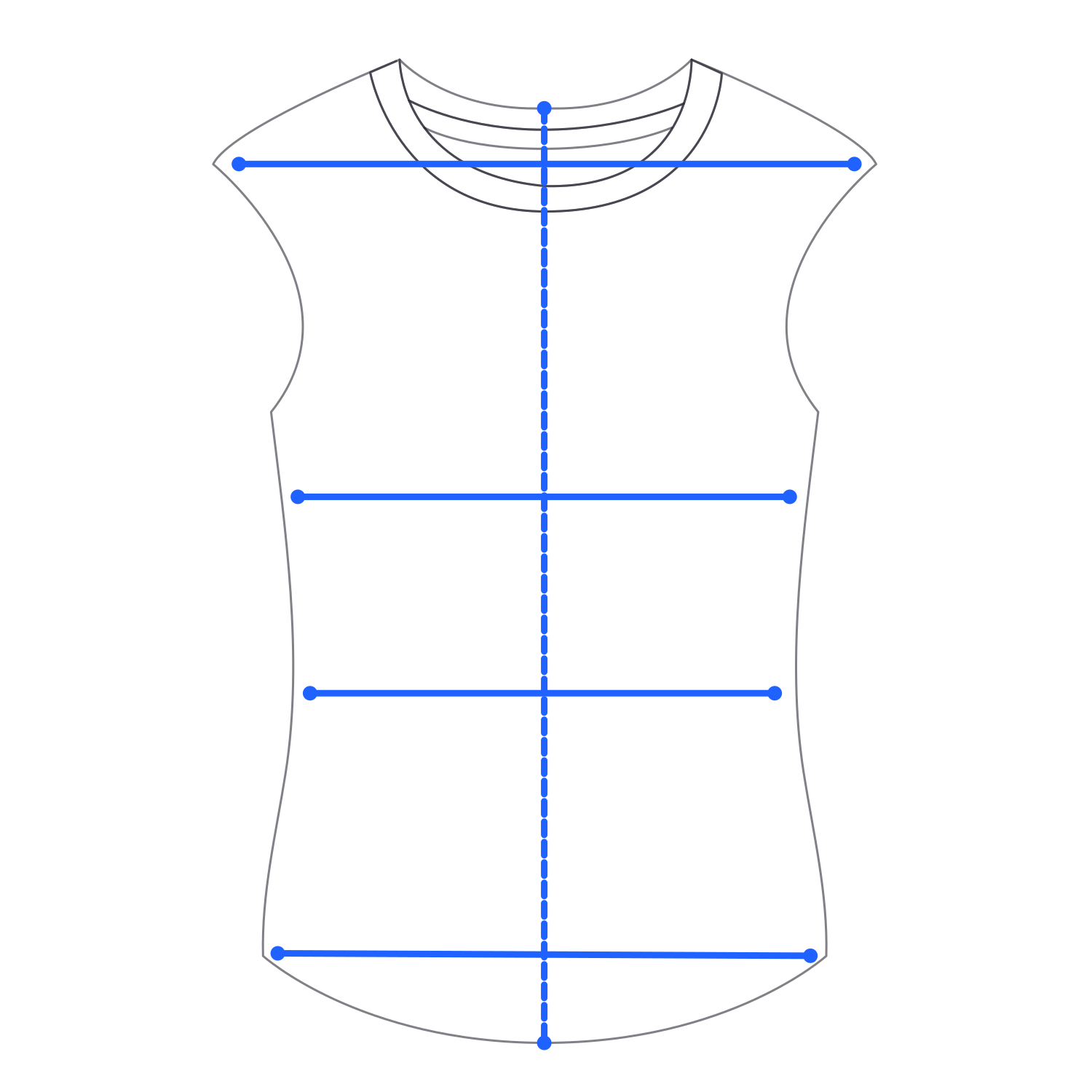
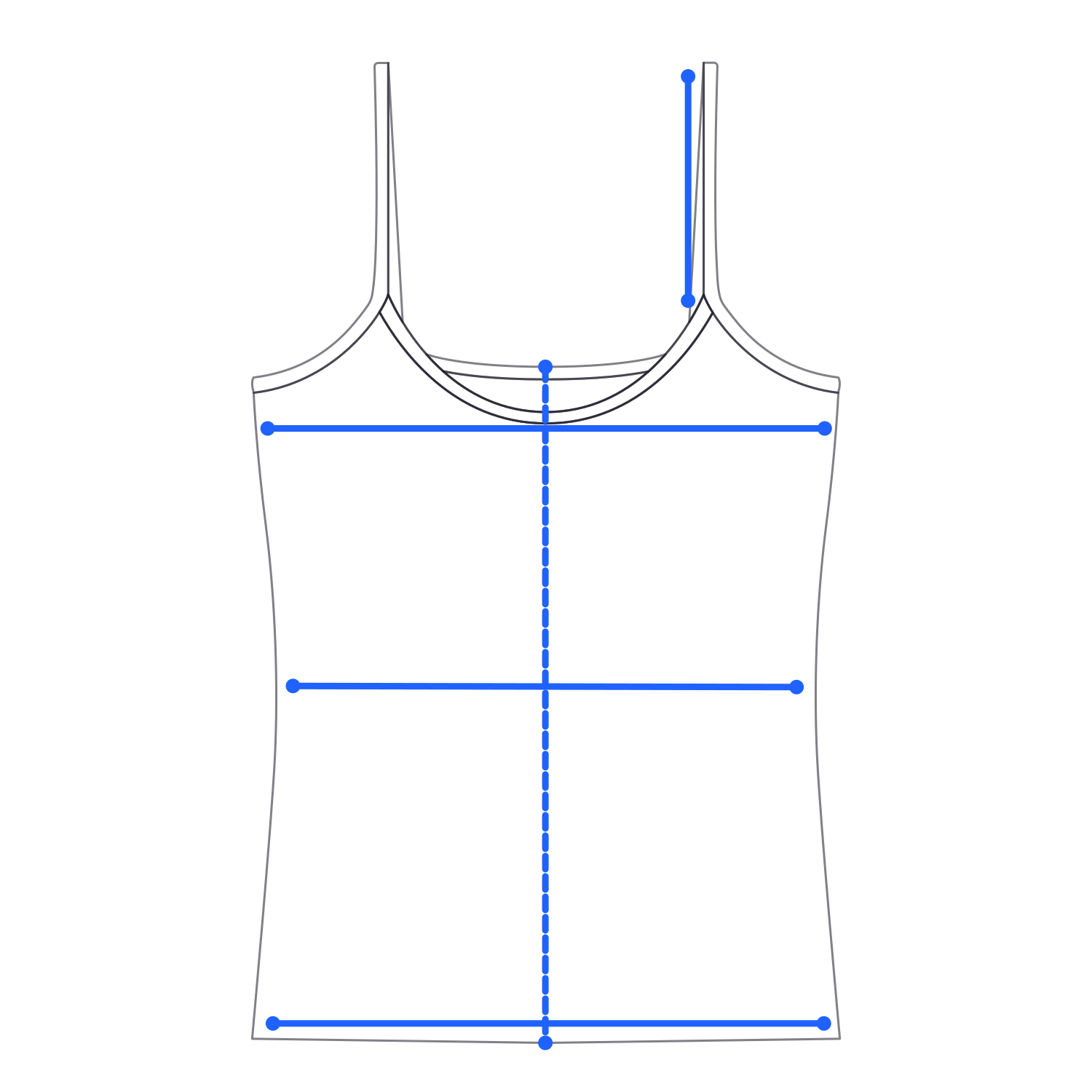
  • Vest drawing with its points of measure markedCamisole drawing with its points of measure marked

    Vests, tanks & camisoles

    Tank tops, vests, suit vests, camisoles, strap tops

    • Chest width
    • Body length
    • Waist width
    • Hem width
    • Shoulder width
    • Strap length

    Vests: shoulder width. Camisoles: strap length.

    5 measurements each

  • Trousers drawing with its points of measure marked

    Trousers & jeans

    Jeans, chinos, tailored trousers, joggers, wide-leg, cargo

    • Waist width
    • Front rise
    • Thigh width L+R
    • Inseam L+R
    • Outseam L+R
    • Knee width L+R
    • Leg opening L+R

    12 measurements

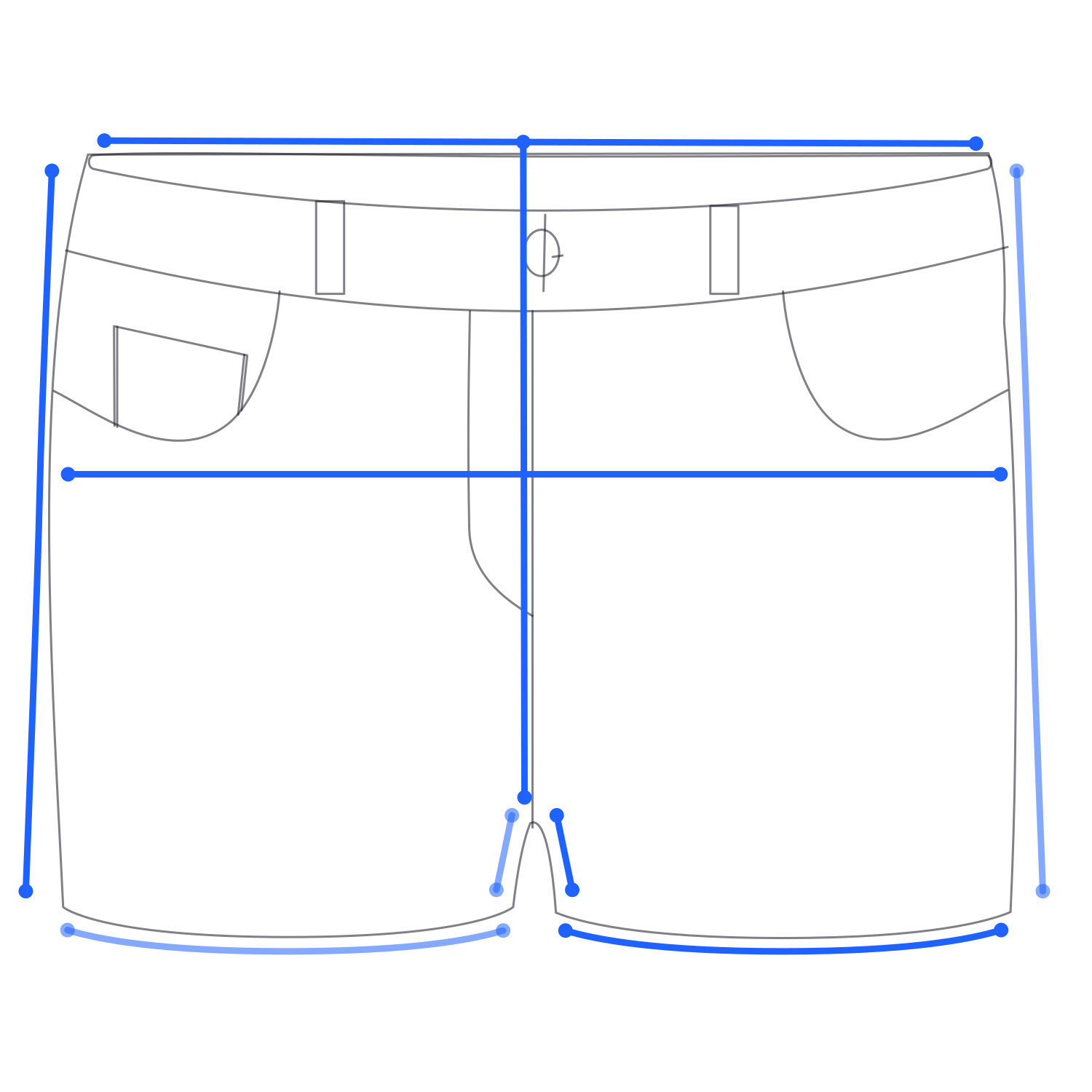
  • Shorts drawing with its points of measure marked

    Shorts

    Denim, chino, Bermuda, athletic and swim shorts

    • Waist width
    • Hip width
    • Front rise
    • Inseam L+R
    • Outseam L+R
    • Leg opening L+R

    9 measurements

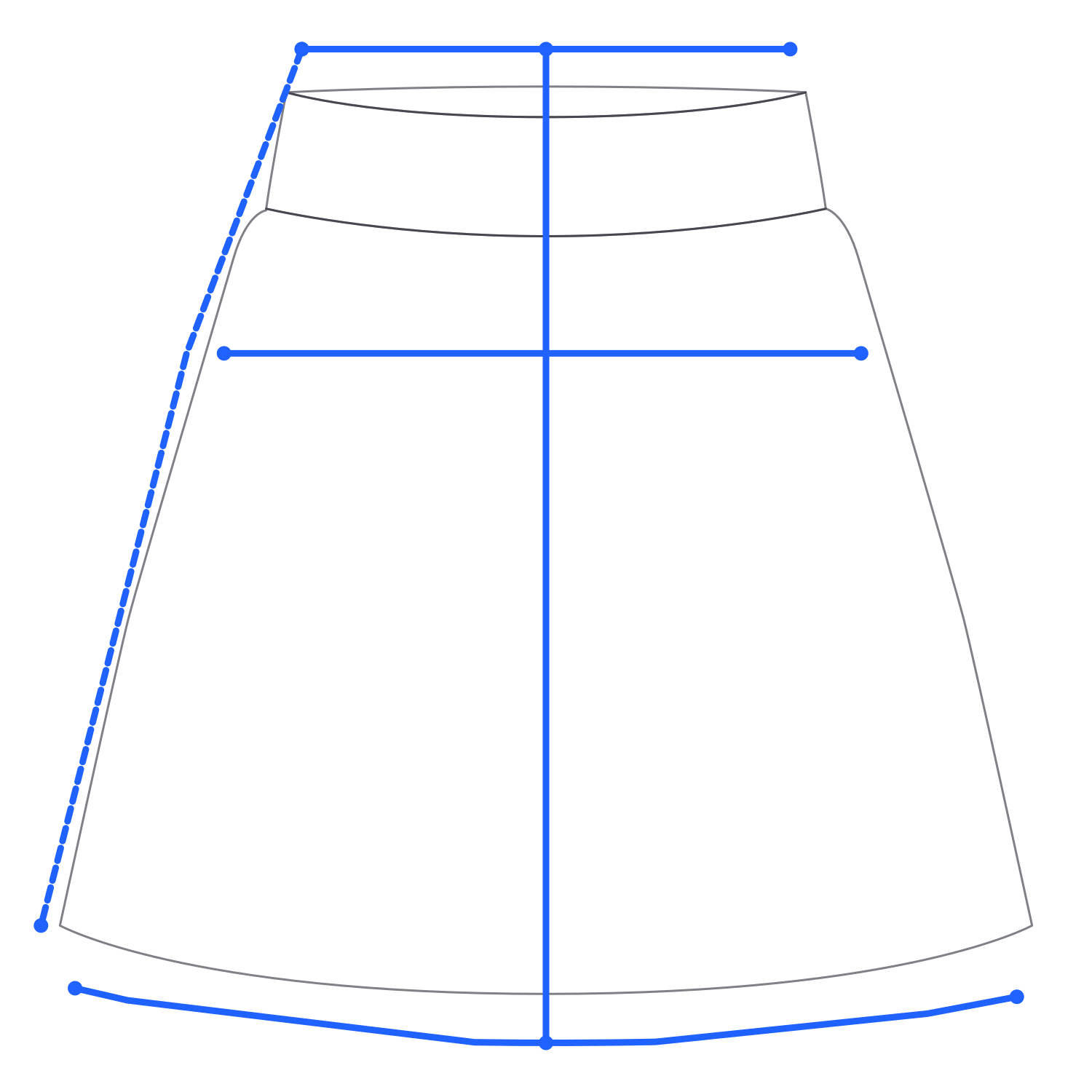
  • Skirt drawing with its points of measure marked

    Skirts

    Mini, midi, maxi, A-line, pencil, pleated, denim

    • Waist width
    • Hip width
    • Centre length
    • Side seam length
    • Hem width

    5 measurements

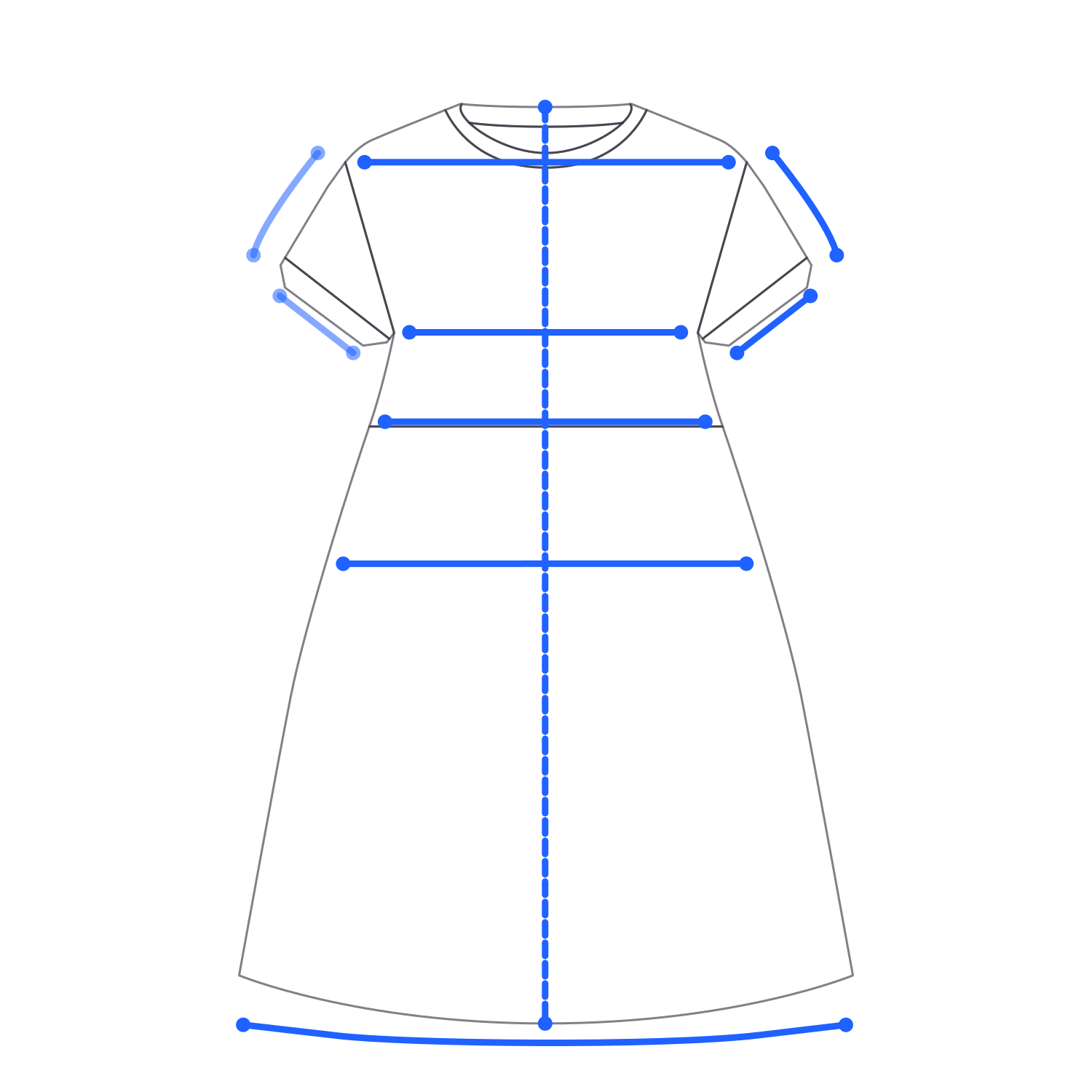
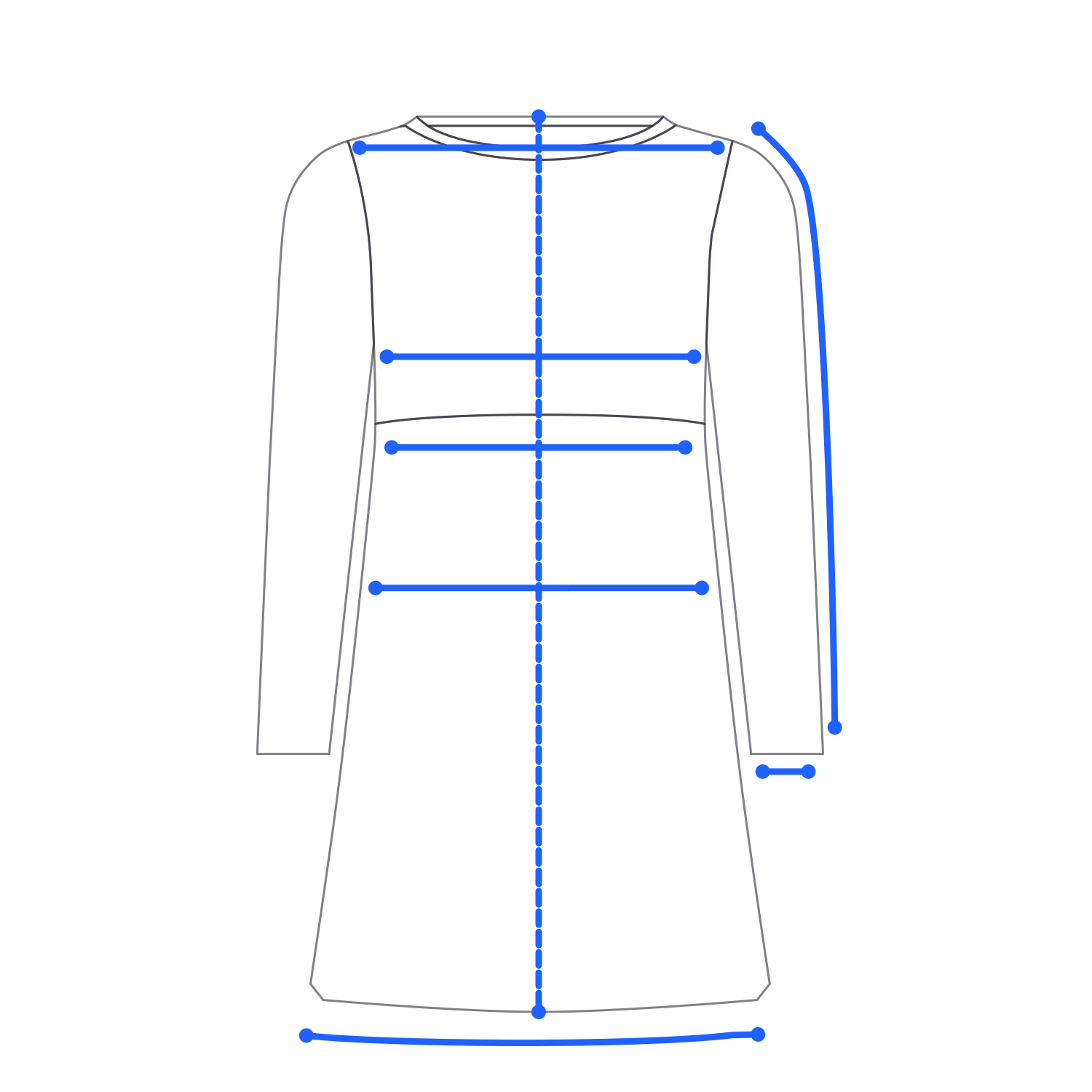
  • Short-sleeve dress drawing with its points of measure markedLong-sleeve dress drawing with its points of measure marked

    Dresses with sleeves

    T-shirt, shirt, wrap, sweater and A-line dresses

    • Chest width
    • Body length
    • Waist width
    • Hip width
    • Shoulder width
    • Hem width
    • Sleeve length L+R
    • Sleeve opening L+R

    Short sleeve: both sides. Long sleeve: one side.

    10 short sleeve · 8 long sleeve
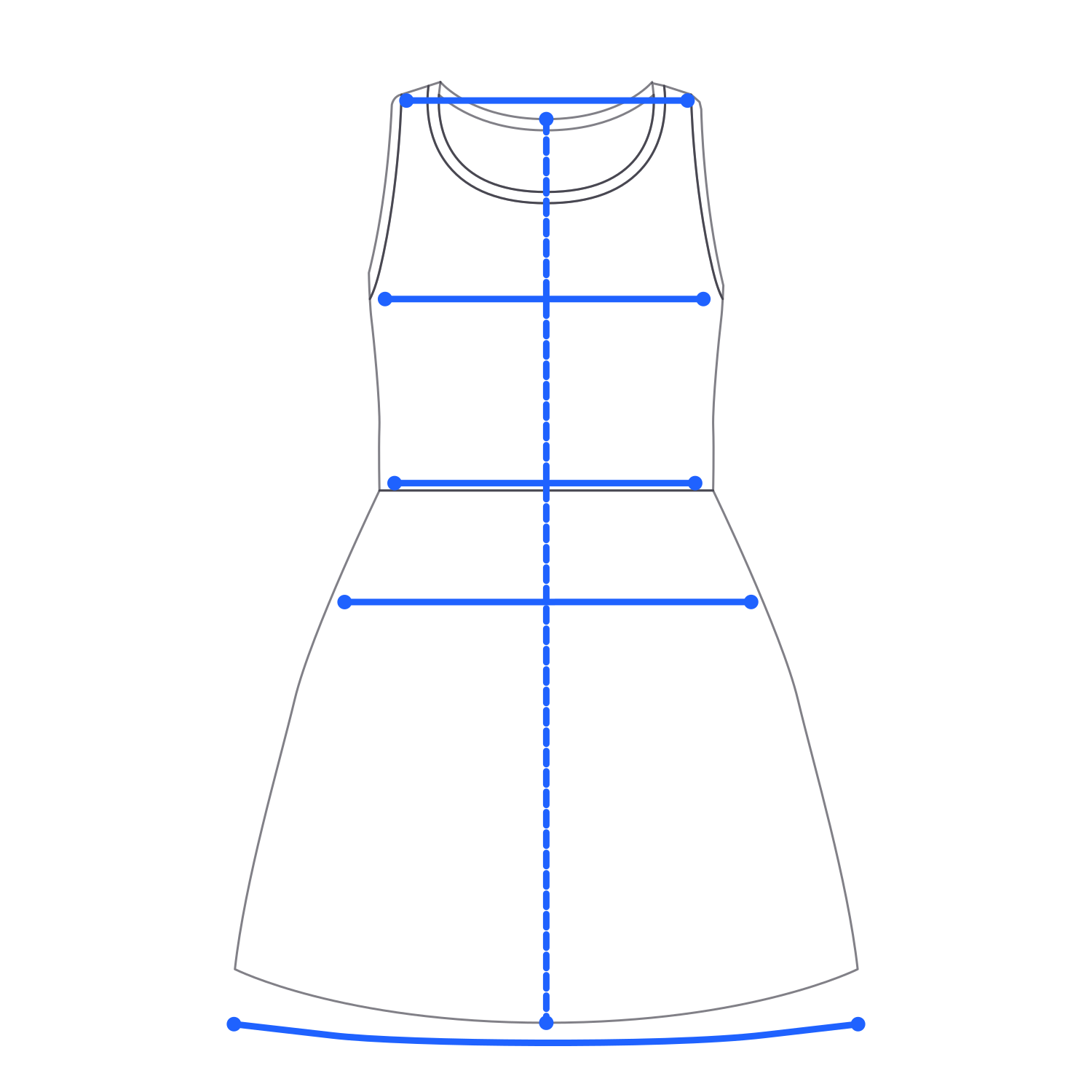
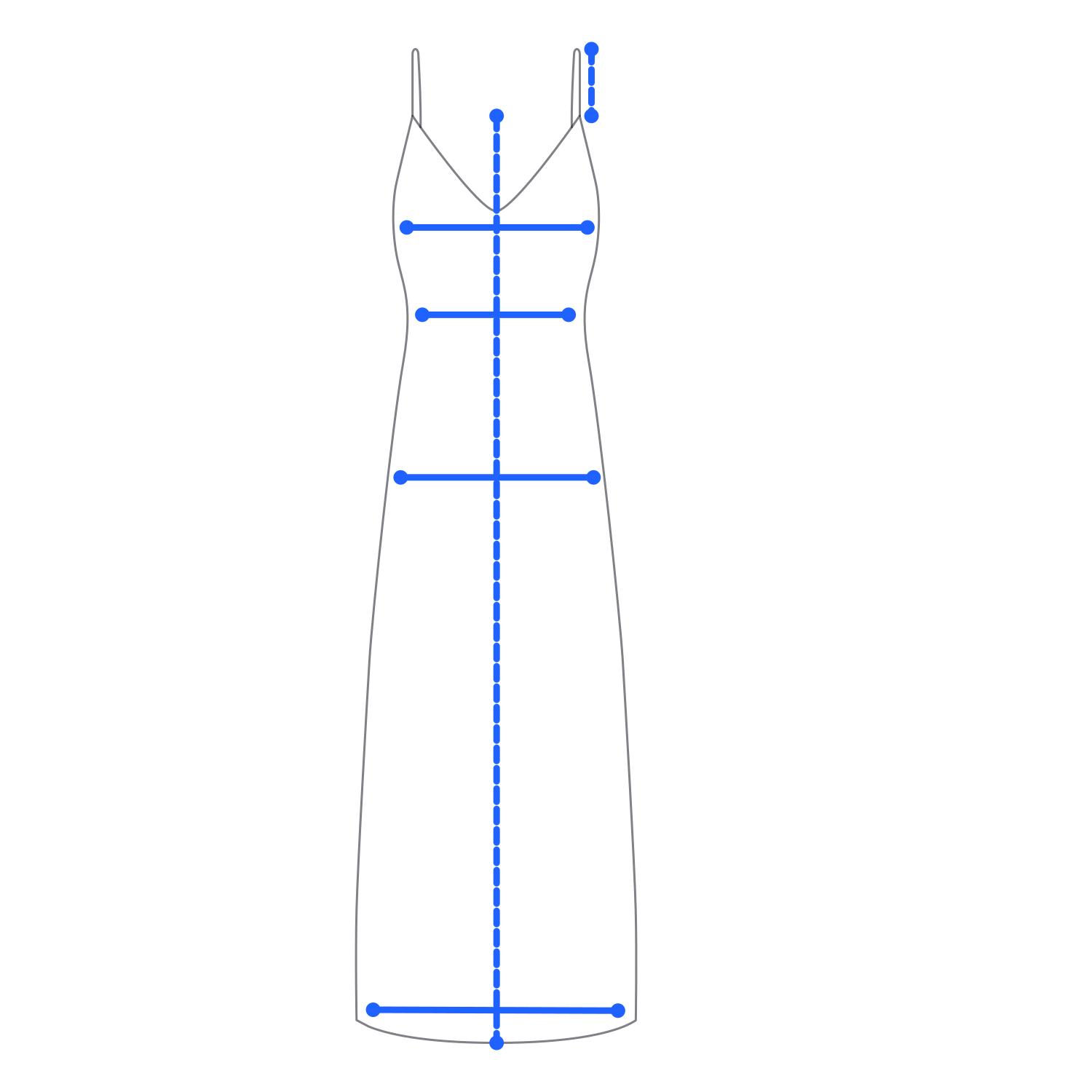
  • Sleeveless dress drawing with its points of measure markedSlip dress drawing with its points of measure marked

    Sleeveless & slip dresses

    Shift, tank, sun, slip and cami dresses

    • Chest width
    • Body length
    • Waist width
    • Hip width
    • Hem width
    • Shoulder width
    • Strap length

    Sleeveless: shoulder width. Slip: strap length.

    6 measurements each

L+R = measured on the left and right sides. Widths are measured flat; circumference = width × 2.

How to measure clothes for selling

To measure clothes for selling, lay the garment flat, measure the width points buyers compare (chest or waist, length, sleeve or inseam) and list them in the units your buyers use. Size AI does this in one capture: up to 12 measurements in 0.92 seconds, copied into the listing.

What to list for each garment

Basic is the minimum buyers compare. Full is every measurement Size AI takes for that garment, all from the same capture, so listing more than the minimum costs nothing.

Measurements to list, by garment: the basic set and the full set Size AI captures
Tops, shirts, and knitwearBasicChest width, body length, shoulder width, sleeve lengthFull9 measurementsChest width, body length, shoulder width, waist width, hem width, sleeve length L+R, sleeve opening L+R
Jackets and coatsBasicChest width, body length, shoulder width, sleeve lengthFull6 measurementsChest width, body length, shoulder width, sleeve length, sleeve opening, hem width
Trousers and jeansBasicWaist width, front rise, inseam, leg openingFull12 measurementsWaist width, front rise, thigh width L+R, inseam L+R, outseam L+R, knee width L+R, leg opening L+R
ShortsBasicWaist width, hip width, inseam, leg openingFull9 measurementsWaist width, hip width, front rise, inseam L+R, outseam L+R, leg opening L+R
Dresses with short sleevesBasicChest width, waist width, hip width, body lengthFull10 measurementsChest width, body length, waist width, hip width, shoulder width, hem width, sleeve length L+R, sleeve opening L+R
Dresses with long sleevesBasicChest width, waist width, hip width, body lengthFull8 measurementsChest width, body length, waist width, hip width, shoulder width, hem width, sleeve length, sleeve opening
SkirtsBasicWaist width, hip width, centre lengthFull5 measurementsWaist width, hip width, centre length, side seam length, hem width

L+R = measured on the left and right sides. Vests, camisoles, short-sleeve jackets, and sleeveless and slip dresses have their full sets in the garment list above.

Flat widths or circumference?

Is a 32 waist actually 32 inches? Often not. The size on the label is nominal, and the measured flat waist times two is what actually fits. Size AI shows every width measured flat, so double it for the circumference and say in the listing which one you give.

For general tape-measure basics, such as where the tape goes on each garment, see the Sizely measuring guide.

Where the numbers go

On eBay, add the measurements to the item specifics. On Poshmark, Grailed, Mercari, and Depop, put them at the top of the description, where buyers look first. Copy Measurements copies a garment’s full set in one tap, and One-Tap Export saves the measurement image to your camera roll, ready to upload with the listing.

The same capture feeds the rest of the listing: the Label Scanner reads brand, size, and fabric from the tag, and Photo Studio turns the flat lay into ghost mannequin photos.

Why fewer returns?

Listed measurements let a buyer check the size before they buy, so measured listings come back less often: fashion sellers using Size AI cut their return rate from the industry-average 24.4% to 5.5%, which is 77% fewer returns.

How accurate is Size AI?

Size AI measures garments to ~5 mm (1⁄5 in) typical accuracy with LiDAR and about 9 mm (3⁄8 in) without it. Unlike apps that estimate from a single photo, Size AI measures depth with LiDAR.

With LiDAR
~5 mm (1⁄5 in) typicaliPhone 12 Pro and Pro Max through iPhone 17 Pro and Pro Max, and iPad Pro 11 in and 12.9 in models from 2020 and later.
Without LiDAR
About 9 mm (3⁄8 in) typicaliPhone 11 and later. Teams that need to measure standard photos from non-LiDAR devices can do it through the API.
One capture vs a tape pass
0.92 s, up to 100x faster than measuring by handOne capture replaces a full pass with a tape, and it is repeatable: lay the same garment out the same way and the numbers stay consistent, without the stretch a second tape pass adds.
Typical measurement error: about 5 mm (1/5 in) with LiDAR and about 9 mm (3/8 in) without LiDAR. Shorter bar is better.Size AI with LiDAR~5 mm · 1⁄5 inSize AI without LiDAR~9 mm · 3⁄8 inTypical measurement error · shorter bar is better
~5 mm (1⁄5 in) typical with LiDAR. About 9 mm (3⁄8 in) without LiDAR.

Note: Where to look twice

~5 mm is the typical figure. Full-length measurements such as body length and outseam run wider than that, so check those arrows first. For the engineering behind the 0.92-second capture, read how we shrank LiDAR garment measurement.

Common questions

Can I measure clothes with my phone?

Yes. Size AI uses the LiDAR sensor on iPhone 12 Pro and later Pro models, and on iPad Pro from 2020, to measure a garment laid flat. One capture takes 0.92 seconds and returns up to 12 measurements at ~5 mm (1⁄5 in) typical accuracy. Without LiDAR, it works on iPhone 11 and later at about 9 mm.

Is there a free app to measure clothes?

Yes. Size AI’s free plan includes 10 scans and 3 Photo Studio photos a month, with no credit card. Every feature is included, so you can measure, scan labels, and write listings before you pay. Paid plans start at $9.99 a month when you need more scans.

How accurate is a phone measurement compared with a tape measure?

Size AI measures to ~5 mm (1⁄5 in) typical accuracy with LiDAR and about 9 mm (3⁄8 in) without it. One capture replaces a full tape pass and runs up to 100x faster than measuring by hand. Long measurements like body length and outseam run wider than the typical figure, so check those arrows first.

Which iPhones can measure garments with LiDAR?

LiDAR capture works on iPhone 12 Pro and Pro Max through iPhone 17 Pro and Pro Max, plus iPad Pro 11 in and 12.9 in models from 2020 and later. Size AI also works without LiDAR on iPhone 11 and later, with typical accuracy around ~9 mm (3⁄8 in).

What measurements does Size AI take on a shirt? On jeans?

A shirt gets 9 measurements: chest width, body length, shoulder width, waist width, and hem width, plus sleeve length and sleeve opening on both sides. Jeans get 12: waist width and front rise, plus thigh, inseam, outseam, knee, and leg opening on both sides. Jackets get 6 and skirts get 5.

Do you measure clothes flat or all the way around?

Flat. Size AI measures widths with the garment laid flat, the way garment measurements are usually listed. To get a circumference, double the width. That is also why a labelled 32 waist often measures differently: the label is nominal, and the measured flat waist times two is what actually fits.

Can Size AI measure clothes from a photo?

The app measures from its own live capture, not from a photo imported from your camera roll, so the level guide and the distance and light indicators can check the setup first. For teams that need it, standard photos from non-LiDAR devices can be measured through the API at about 9 mm (3⁄8 in) typical accuracy.

Does it work without internet?

Yes. Measurement runs on-device, so you can capture in a thrift store, a warehouse, or anywhere with no signal. Label scanning works offline too. Cloud features like Photo Studio need a connection, but the 0.92-second measurement flow does not.

Which garments are supported?

Size AI supports 90+ garment types in 9 categories, from T-shirts and hoodies to jeans, skirts, and maxi dresses. The supported garments guide lists every type. Shoes, bags, and jewelry are not measured, because the capture is built for flat-laid cloth.

How do I measure clothes for selling on eBay, Poshmark, or Depop?

Lay the garment flat and measure the widths buyers compare: chest or waist, length, and sleeve or inseam. Size AI takes up to 12 measurements in one 0.92-second capture. Copy Measurements copies them all in one tap, ready to paste into your eBay item specifics or your Poshmark and Depop description.

Still stuck? The support FAQ covers device checks and accuracy troubleshooting.

Measure garments, scan labels, create pro shots & product descriptions all from your iPhone. Built for sellers & retailers.

Download Now
©2026 - All Rights Reserved.